

Change or cancel a courier booking
Shopify parcels are booked with a courier at Pick & Pack (see Ship a Shopify order). Until the parcel is handed to the courier, an admin can change the courier or cancel the booking from the order’s details.
Before you start
Section titled “Before you start”- The order is a Shopify order with a courier booking.
- The parcel hasn’t been handed over yet. If it’s scanned into an open handover, take it out of that handover first (see Hand parcels to the courier).
Change the courier
Section titled “Change the courier”-
Open Orders, find the order and click Order Details.
-
The booking box shows the booking, e.g. “EasyParcel · J&T Express … · Pickup · S$4.20 · booked by …”, and the tracking number.
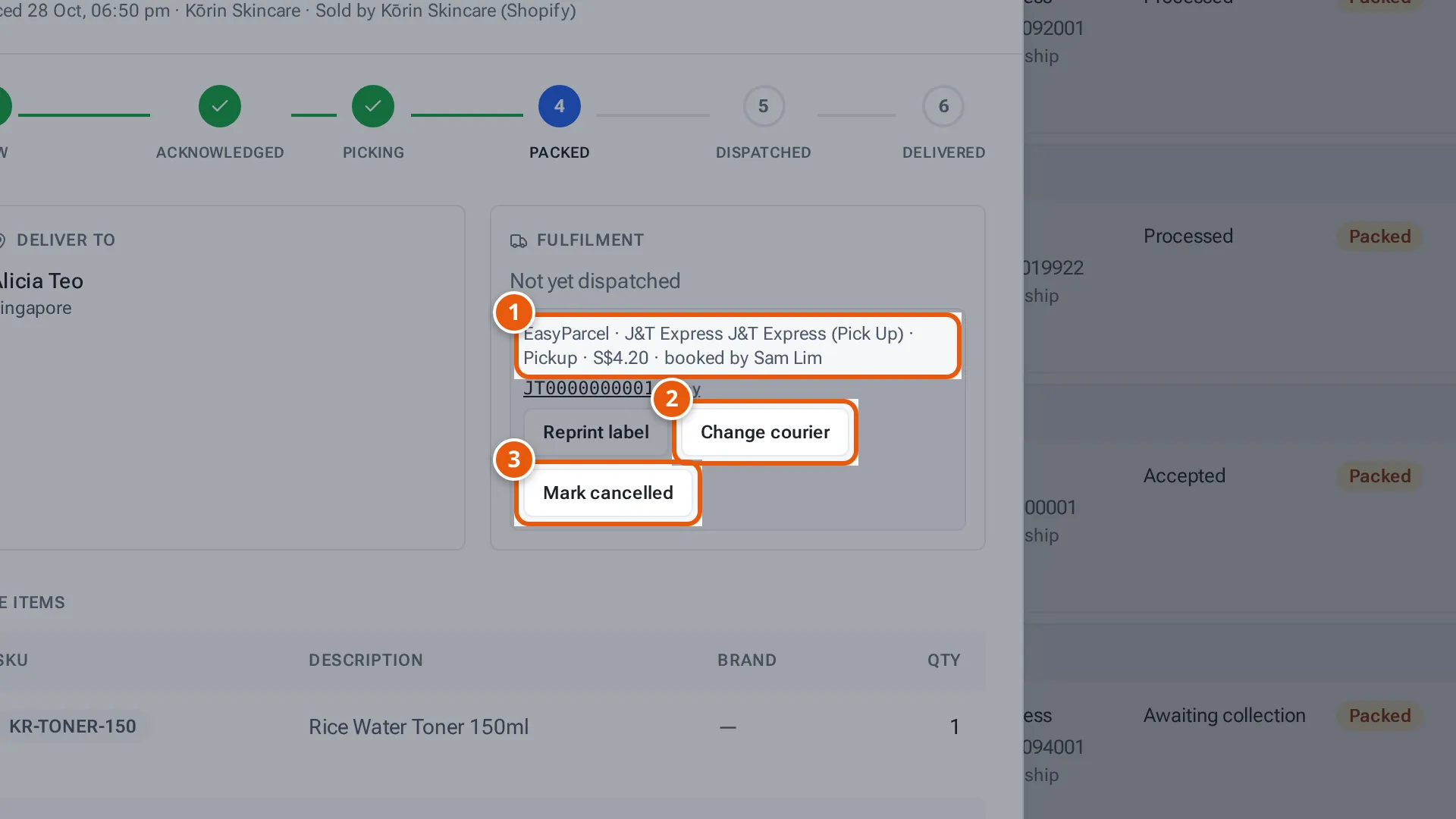
- 1. The booking: who booked it, the courier, the service and the cost.
- 2. Book another courier for the parcel.
- 3. Cancel the booking. The order goes back to Pick & Pack.
Tap or click the picture to open it full size. -
Click Change courier. The box “New courier for this parcel” opens.
-
Check the Weight (kg), Length (cm), Width (cm) and Height (cm). They’re filled in from the products.
-
Choose the new Courier and service. Prices refresh when you leave a size field.
-
Click Book new courier (or Change courier for a courier from the “Other” group), and confirm. The current booking is cancelled (EasyParcel refunds it to the wallet), the new courier is booked, and the buyer is emailed the new tracking number.
-
The new courier’s label opens to print. The booking box says “Courier changed to … · …”.
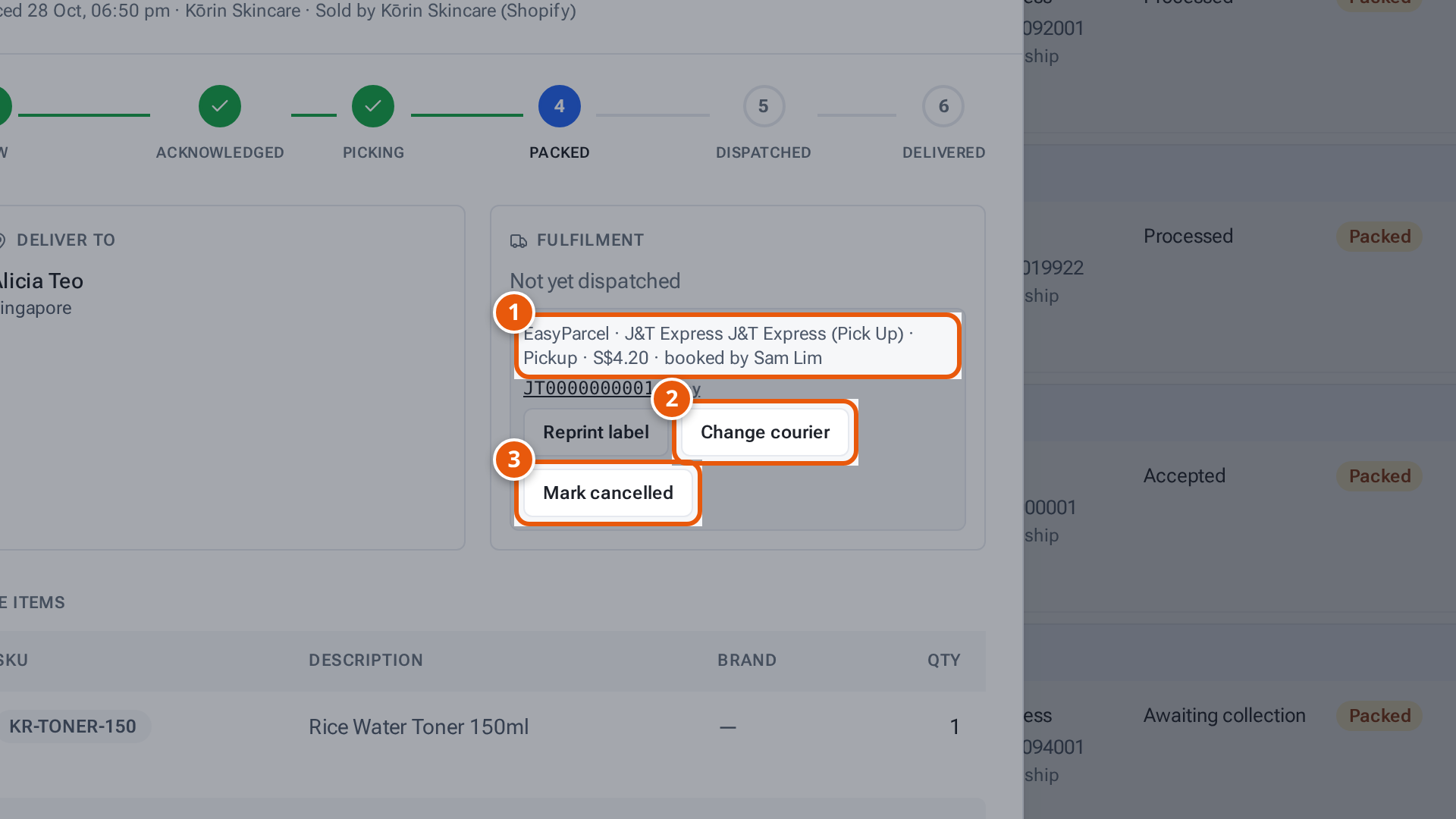
- 1. The parcel’s weight and size, filled in from the products.
- 2. Choose the new courier and service.
- 3. Book it. The old booking is cancelled.
- 4. Close without changing anything.
Keep the current courier closes the box without changing anything.
Cancel the booking
Section titled “Cancel the booking”- In the booking box, click Mark cancelled.
- Confirm. For EasyParcel: “Cancel this EasyParcel booking? EasyParcel refunds it to the wallet and it stays off the seller’s invoice. A packed parcel comes off the courier’s handover and the order goes back to Pick & Pack (Shopify shows it unfulfilled again).” For the seller’s own account, it’s cancelled on that account.
- The box says “Cancelled”. The order is back at Pick & Pack to pack and book again.
What each button and field means
Section titled “What each button and field means”| Item | What it means |
|---|---|
| Reprint label | Open the current label again. |
| Change courier | Book another courier for this parcel. |
| Finish courier change | Shown when a change got half-way: finish it. |
| Mark cancelled | Cancel the booking and send the order back to Pick & Pack. |
| “Booked by the seller” group | A label the seller uploaded. |
| “— warehouse account” / “— seller’s account” group | EasyParcel, or the seller’s own J&T, with each service’s price. |
| “Other” group | Couriers from Settings → Shipping → Couriers; scan their tracking number. |
A parcel packed with another courier or the seller’s label
Section titled “A parcel packed with another courier or the seller’s label”A Shopify order packed with another courier (you typed its tracking number) or the seller’s own label has no booking in theopsroom, so there’s nothing to cancel at a courier. In the order’s details, under the courier, admins see:
- Change courier: choose the courier, type or scan the new Tracking number, and press Save courier. Shopify gets the new tracking number. You see “Courier changed. Shopify has the new tracking number.”
- Undo pack: theopsroom asks “Undo pack? Shopify takes back the fulfilment (it shows unfulfilled again), the parcel comes off the … list, and the order goes back to Pick & Pack. Stock stays picked.” Click OK. You see “Unpacked. The order is back at Pick & Pack.” A seller’s label used for the parcel can be used again.
Both work only before the parcel is handed over, and not while it’s scanned into an open handover. A parcel with a courier booking is undone with Mark cancelled, which cancels the booking too.
If something goes wrong
Section titled “If something goes wrong”| Message | Why | What to do |
|---|---|---|
| “This parcel has been handed over — its courier can’t be changed” | It’s gone with the driver. | Nothing to change in theopsroom. |
| “This parcel is scanned into the open … handover — take it out of the handover first” | It’s in a handover being scanned. | Take it out of the handover, then try again. |
| “This order isn’t packed — choose its courier at Pick & Pack” | It hasn’t been packed. | Choose the courier when packing. |
| “Shopify didn’t take the new tracking for … (…) — nothing was changed” | Shopify refused the new tracking. | Try again later. |
| “The … booking is cancelled (refunded), but … didn’t book … (…) — press Change courier to book another” | The old one is cancelled but the new one failed. | Click Change courier and choose another. |
| “Not confirmed by … — check this order in …, then mark it cancelled to book again” | The courier service didn’t confirm the cancel. | Check in EasyParcel or J&T, then Mark cancelled again. |
| “No courier has prices for this parcel — choose another courier” | No prices for this size. | Check the size, or choose another courier. |