

Connect a Shopee shop
Connecting a seller’s Shopee shop lets theopsroom bring in its orders, keep its stock right, publish products and handle returns and buyer cancellations. You start in theopsroom, then sign in on Shopee’s own page and approve theopsroom.
Before you start
Section titled “Before you start”- You need the seller’s Shopee login, or the seller next to you to sign in.
- Only Shopee Singapore shops can be connected. Every Singapore shop on the account you approve is connected; shops in other countries are skipped.
-
Open Admin → Shop Connections and click Connect shop.
-
Under Marketplace, choose Shopee.
-
Choose the client the shop is for, or + New client and type the Client name.
-
Click Continue to Shopee. Your browser goes to Shopee’s page.
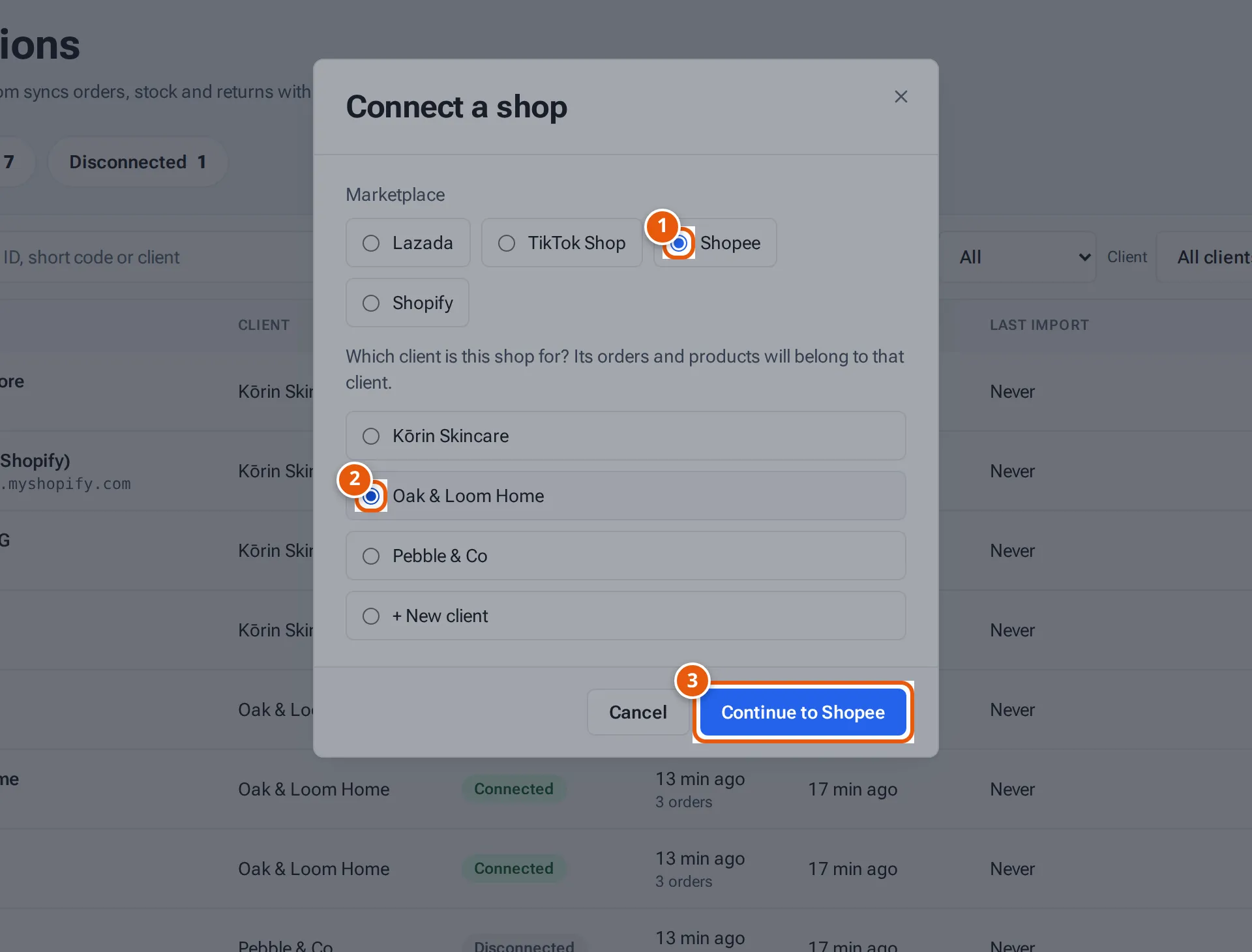
- 1. The marketplace.
- 2. The client the shop is for.
- 3. Go to Shopee to sign in and approve theopsroom.
Tap or click the picture to open it full size. -
Sign in with the seller’s Shopee account and approve theopsroom.
-
Shopee sends you back to Shop Connections. A green banner says “Shopee shop connected. Importing the last 30 days of orders…”
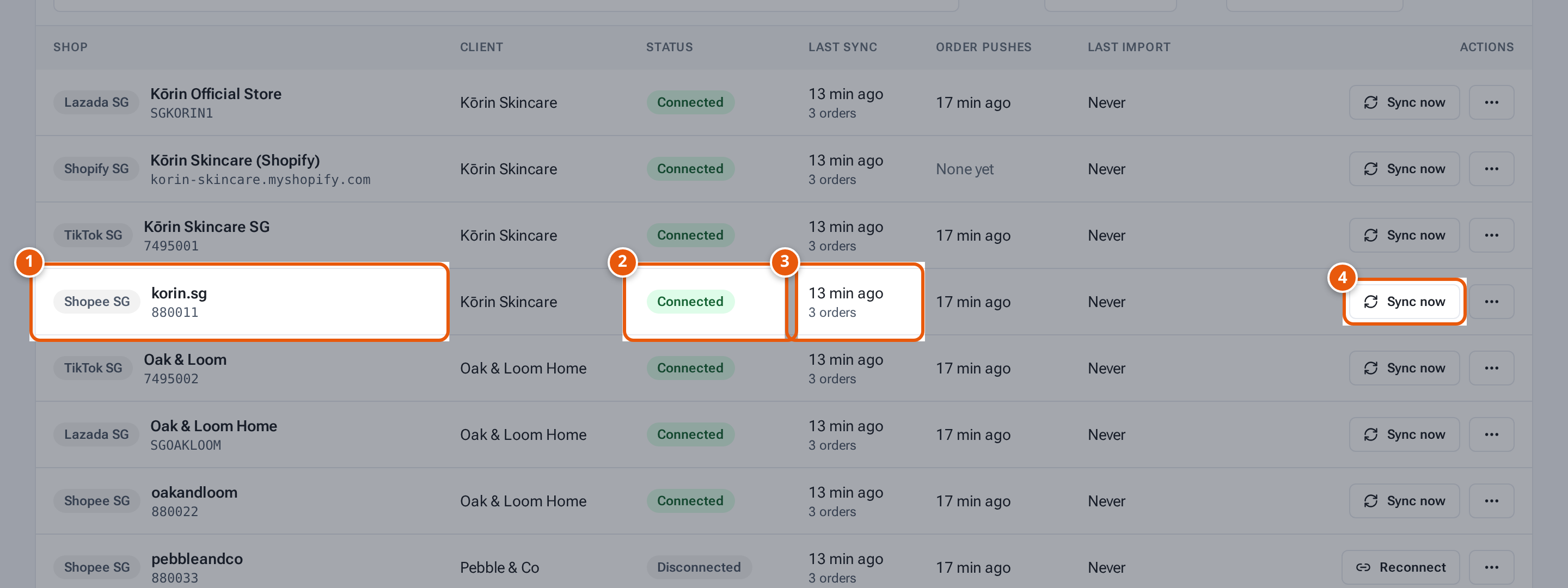
- 1. The shop, with the marketplace and country. Click its name to see its details.
- 2. Connected: theopsroom brings in its orders every 5 minutes.
- 3. When orders were last brought in, and how many.
- 4. Bring in new orders now instead of waiting.
Shopee access runs out
Section titled “Shopee access runs out”Shopee’s approval lasts a limited time. Seven days before it ends, the shop’s row says “Shopee access ends on … — Reconnect to extend”. Click Reconnect and approve theopsroom on Shopee again. See Look after shops.
What theopsroom asks permission for
Section titled “What theopsroom asks permission for”theopsroom uses Shopee Open Platform with these permissions: shop authorisation, orders (read; arrange shipment; shipping documents), products (create, update and delete items and models; categories, attributes and brands; images), stock, returns and buyer cancellations, and push notifications for orders and returns.
What each button and field means
Section titled “What each button and field means”| Item | What it means |
|---|---|
| Marketplace | Which marketplace to connect. |
| Client | Who the shop belongs to. Its orders, products and listings belong to that client. |
| + New client | Make a new client as you connect. |
| Continue to Shopee | Go to Shopee to approve. Greyed out until you choose a client. |
If something goes wrong
Section titled “If something goes wrong”| Message | Why | What to do |
|---|---|---|
| “Only Shopee Singapore shops can be connected.” | The account has no Singapore shop. | Connect a Shopee Singapore shop. |
| “Shopee isn’t set up yet (missing partner keys)” | The Shopee keys aren’t on the server. | Ask whoever runs your hosting. |
| “Connection cancelled on the marketplace — nothing was connected.” | The approval was cancelled on Shopee. | Click Connect shop again. |
| “That connect link expired or was already used. If the shop is listed below it is connected; otherwise click Connect shop again.” | The sign-in took too long, or the page was reloaded. | Check the list; if the shop isn’t there, start again. |
| “This shop already belongs to another client. Use Move to client to change it.” | The shop is connected for another client. | Use Move shops to another client. |