Skip to content

Answer a buyer's cancellation request

On TikTok Shop and Shopee, a buyer can ask to cancel an order before it ships. theopsroom shows the request on the order, and you approve or reject it from there. Until it’s answered, the warehouse is warned before packing the order.

  • This works for TikTok Shop and Shopee orders. Lazada and Shopify requests are answered in their own Seller Center or admin.
  • Answer before the marketplace’s deadline. If you don’t, the marketplace decides by its own rules.
  1. Open Orders and click Cancel requested to see only orders with a request.
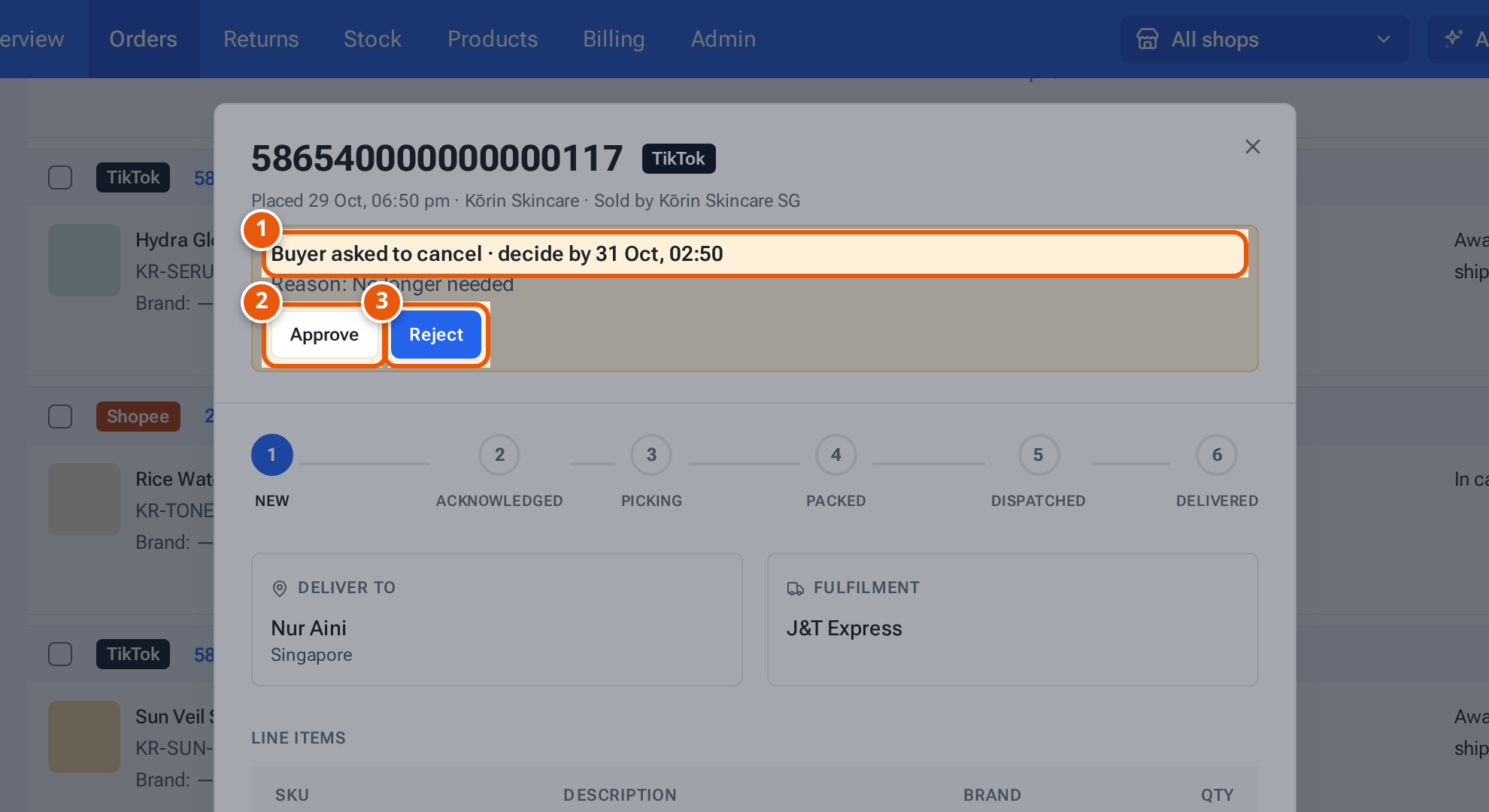
  2. Click Details on the order’s row. The yellow box at the top says “Buyer asked to cancel”, the deadline (“decide by …”, Singapore time) and the buyer’s reason.
  3. Choose:
    • Approve: theopsroom asks “Approve the buyer’s cancellation of order …?”. Click OK. You see “Cancellation approved — … will cancel the order.”
    • Reject on Shopee: theopsroom asks “Reject the buyer’s cancellation of order …?”. Click OK.
    • Reject on TikTok Shop: a window opens. Pick TikTok’s Reason (for a packed order the “packed/shipped” reason is already chosen), add a Comment for TikTok (optional), then click Reject and send.
  4. After a rejection you see “Cancellation rejected — the order goes ahead.” The box then says “you approved it; waiting for …” or “you rejected it; waiting for …” until the marketplace confirms.
An order's details with the buyer's cancellation request, its deadline, Approve and Reject
  1. 1. The buyer asked to cancel, and the time TikTok needs your answer by. The buyer’s reason is under it.
  2. 2. Approve: the marketplace cancels the order.
  3. 3. Reject: the order goes ahead. TikTok asks you for a reason.

Tap or click the picture to open it full size.
Item What it does
“Buyer asked to cancel · decide by …” The request and its deadline (TikTok gives one; Shopee may not).
“Reason: …” The reason the buyer gave.
Approve The marketplace cancels the order. It won’t be packed.
Reject The order goes ahead and the warehouse packs it.
Reason (TikTok) One of TikTok’s own reasons. You must choose one.
Comment for TikTok (optional) A note sent with the rejection.
Message Why What to do
“This cancellation request is already closed” The buyer withdrew it, or the marketplace already decided. Nothing to do. The order shows its new state after the next sync.
“Already sent to … for this request” Someone already answered this request. Wait for the marketplace to confirm.
“Choose a reason” You clicked Reject and send without a reason. Pick a reason from the list.
“Couldn’t load TikTok’s reasons” theopsroom couldn’t get the list from TikTok. Close the window and try again in a minute.
A message says cancellation requests on that marketplace can’t be answered from the app That marketplace isn’t supported here. Answer it in the marketplace’s Seller Center.
“… actions for returns are switched off” Answering from theopsroom is switched off for that marketplace for now. Answer it in the marketplace’s Seller Center.
“… refused it: …” The marketplace said no, with its reason. Read the reason; answer in Seller Center if needed.