

When a return counts as overdue
A return that is on its way back to the warehouse (On the way) for longer than a set number of days is marked Overdue. Overdue returns have their own Overdue stage in Returns (they are not counted in On the way), and the Overview shows “… returns overdue — not arrived yet” under Needs attention. The number of days is one setting for everyone; only admins can change it. It starts at 14.
- Open Returns.
- In the bar above the list, type the number of days (1 to 365).
- Click Save. You see “Returns now count as overdue after … days.”
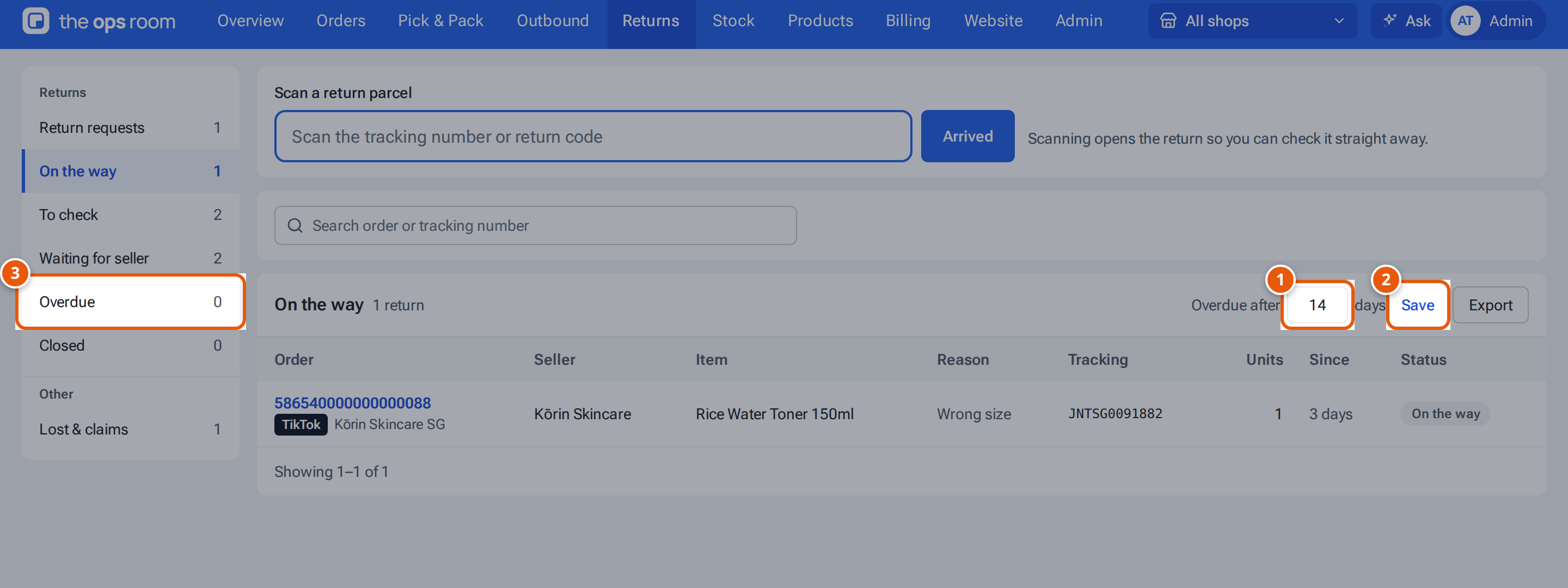
- 1. After how many days on the way a return counts as overdue.
- 2. Save it for everyone.
- 3. Returns that waited longer than this have their own Overdue stage.
What each button and field means
Section titled “What each button and field means”| Item | What it means |
|---|---|
| Overdue after (days) | Days a return can be on its way before it’s marked Overdue. |
| Save | Save it for everyone. |
| Overdue chip | Shown on returns past the limit. |
If something goes wrong
Section titled “If something goes wrong”| Message | Why | What to do |
|---|---|---|
| “overdueDays must be a whole number from 1 to 365” | The number is out of range or has decimals. | Type a whole number from 1 to 365. |