

The Returns list
Returns lists every order coming back to the warehouse: returns the buyer asked for, parcels the courier couldn’t deliver, and orders cancelled after packing. Sellers see their own; staff and admins see everyone’s. Click a return to open it.
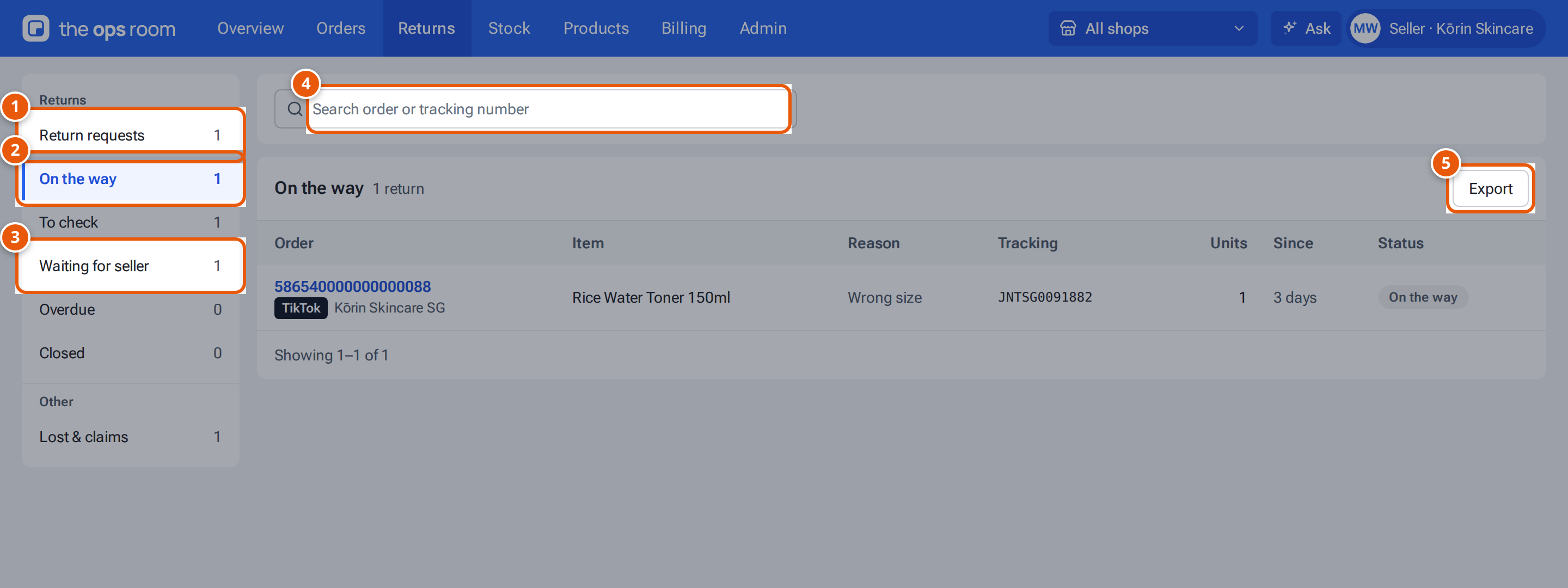
- 1. Requests from buyers that you decide on, soonest deadline first.
- 2. Returns on their way back to the warehouse.
- 3. Checked returns waiting for your decision.
- 4. Find a return by order or tracking number.
- 5. Download this stage’s returns as a CSV for Excel.
The stages
Section titled “The stages”On a computer the stages are in a menu on the left, each with its count. On a phone they are tabs.
| Stage | What’s in it |
|---|---|
| Return requests | Buyers’ return requests waiting for the seller’s decision, soonest deadline first. |
| On the way | Returns on their way back to the warehouse, not yet late. |
| To check | Returns that arrived and wait to be checked. |
| Waiting for seller | Checked returns waiting for the seller to decide (refund, or what to do with damaged items). |
| Overdue | Returns on their way for longer than the overdue limit (14 days unless an admin changed it). The count is red while there are any. They are not counted in On the way. |
| Closed | Finished returns. |
| Lost & claims | Returns that never arrived, and their claims (under Other). |
Each row shows the order, the item (and how many), the reason, and its status. Search by order or tracking number with Search order or tracking number. “Nothing here.” means the stage is empty.
A long stage is shown in pages. On a computer, use the page numbers under the list; on a phone, press Load more. Each stage’s count matches the returns you can open there.
Press Export above the list to download the returns in the stage you are looking at as a CSV, with your search applied. Sellers get only their own returns.
On a computer, click a return to check it in a panel beside the list: staff see the check there, with the list still in view. Click the row again, or close the panel, to go back to the full table.
Why a return is coming back
Section titled “Why a return is coming back”| Reason | Meaning |
|---|---|
| Buyer return | The buyer asked to return it. |
| Refund only | The buyer asked for a refund without sending it back. |
| Failed delivery | The courier couldn’t deliver it. |
| Cancelled after packing | The order was cancelled after it was packed. |
| Arrived unannounced | A parcel came back that no marketplace told theopsroom about. |
Status
Section titled “Status”| Status | Meaning |
|---|---|
| Decide by … / Seller to review | A request waiting for the seller’s answer. |
| On the way | Expected back. |
| Overdue | Expected for longer than the overdue setting (14 days unless an admin changed it). It has its own stage. |
| To check | Arrived; the warehouse checks it next. |
| Decide by … / Seller to decide | Checked; waiting for the seller. |
| Lost | Never arrived. |
| Closed | Done. |