

Sellers: start here
As a seller you see only your own shops, products, stock, orders, returns and invoices. Your warehouse receives, packs and ships your stock; you look after your products and listings, answer your buyers’ requests, and follow what the warehouse does.
On a computer, your top bar has these sections. Point at one with a drop-down to see its pages. (If your account uses the side menu instead, the same pages are listed there. See Getting around theopsroom.)
| Top bar | What it’s for |
|---|---|
| Overview | Today’s orders, packing and stock at a glance. See The Overview. |
| Orders | Every order from your shops, and where it is in the warehouse. |
| Returns | Requests to answer, and parcels coming back. |
| Stock → Inventory | Your stock in the warehouse, and what your shops show. Also Running low and Out of stock shortcuts. |
| Products | Products, Upload batches and Listing templates, and under Gifts, Gift rules and Gift lists. |
| Billing | Your invoices from the warehouse. |
| Admin | Shop Connections (your marketplace shops) and Shipping settings (see Your shipping settings). |
Other pages, such as Pick & Pack or Receiving, are your warehouse’s own. If you open one, theopsroom takes you back to your Overview. Ask the guide (on the phone’s More screen) answers questions from this guide. See Ask a question.
On a phone
Section titled “On a phone”On a phone you get five tabs along the bottom: Home, Orders, Stock, Billing and More. Everything else (Returns, Products, Shop Connections, Shipping, Ask the guide) is on More. See Use theopsroom on a phone.
Home shows today’s numbers (Orders, Packed, Shipped, On time over 14 days), then a For you panel of tiles. Tap a tile to open the list behind it:
| Tile | What it opens |
|---|---|
| Waiting to pack | Your new orders. |
| Shipped today | The orders shipped today. |
| Low stock, Out of stock | Those SKUs in Stock. |
| Returns for you | Returns waiting for your decision. |
| Invoice due (marked “All your shops”) | Billing. It adds up what you owe across all your shops. |
| Ship by today | New orders due today. |
| Short of stock | New orders the warehouse can’t fully pick. |
| Shop stock not updated | SKUs whose stock didn’t reach a shop. |
Below the tiles, Needs your answer lists return decisions first, then Your shops today (orders per shop), when each shop last synced, and a trend.
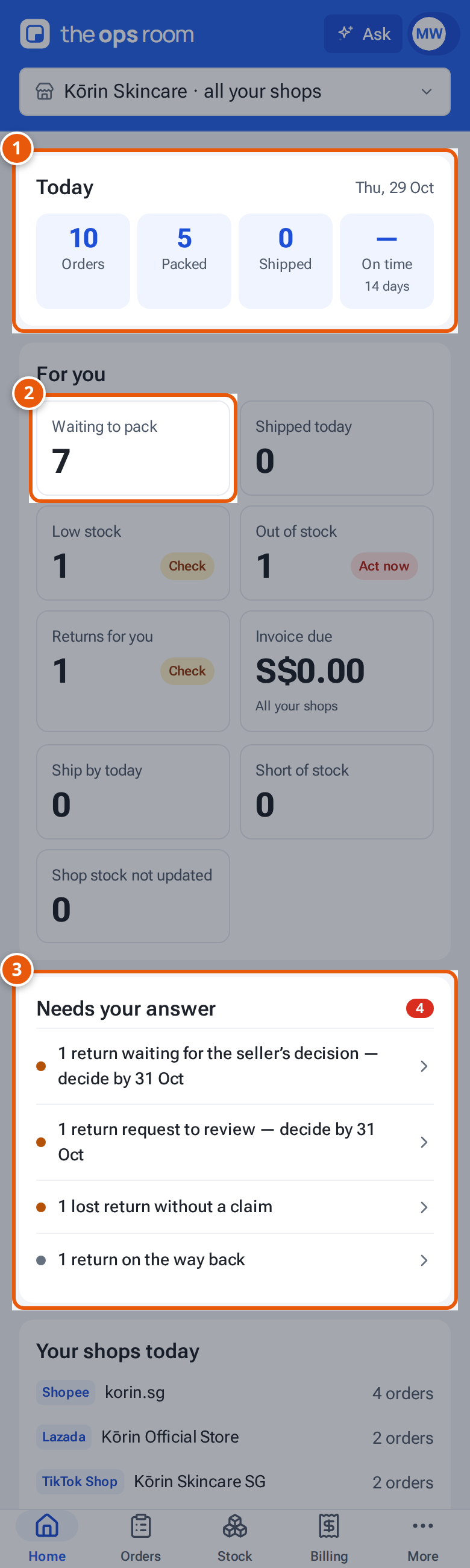
- 1. Today: orders in, packed, shipped and on time.
- 2. For you: tap a tile to open the list behind it.
- 3. Needs your answer: returns and other things waiting for you.
Orders
Section titled “Orders”- Follow your orders
- Answer a buyer’s cancellation request
- Add extras or gifts to orders
- Upload your own shipping labels
Products and listings
Section titled “Products and listings”- Find your products
- Add a product (photos, variations, SKUs, package)
- Write a description with AI
- Duplicate a product
- Delete a product
- Publish a product to a shop
- Listing statuses and fixing a rejected listing
- Send product changes to your shops
- Listing templates
- Publish many products at once (upload batches)
- Import products from a shop