

Sell a set of several items (bundles)
A bundle is a SKU that’s really several of one item, such as a “set of 3” serums. The warehouse keeps only the single item (the base item) on its shelves. When a bundle is ordered, the packer picks three singles. Each bundle listing shows how many sets the free singles make, so you never sell more than you have.
Before you start
Section titled “Before you start”- Make the bundle as its own product in theopsroom, with its own seller SKU (for example KR-SERUM-30-X3), and publish it.
- The base item must be one of your own SKUs. If the single isn’t listed anywhere, make it with Duplicate a product so it exists only in theopsroom.
- Setting up a bundle is done by the warehouse, unless they’ve let sellers do it. If you don’t see Sold as a bundle… in a SKU’s stock window, ask your warehouse to set it up for you.
Steps (when the warehouse lets you)
Section titled “Steps (when the warehouse lets you)”- Open Inventory and click the bundle SKU’s pin button (Where is it?).
- Click Sold as a bundle….
- In Items per bundle, type how many singles make one bundle (2 to 100).
- In Base item (the single item on the shelf), type its seller SKU or name, then click Use … (or press Enter for the first).
- Click Save bundle.
If the bundle SKU already has units on the shelves, theopsroom won’t make it a bundle: you see “… has … units in the warehouse”, with a note to ask the warehouse to clear them first. Ask your warehouse to clear those units, then try again.
Reading bundles in Inventory
Section titled “Reading bundles in Inventory”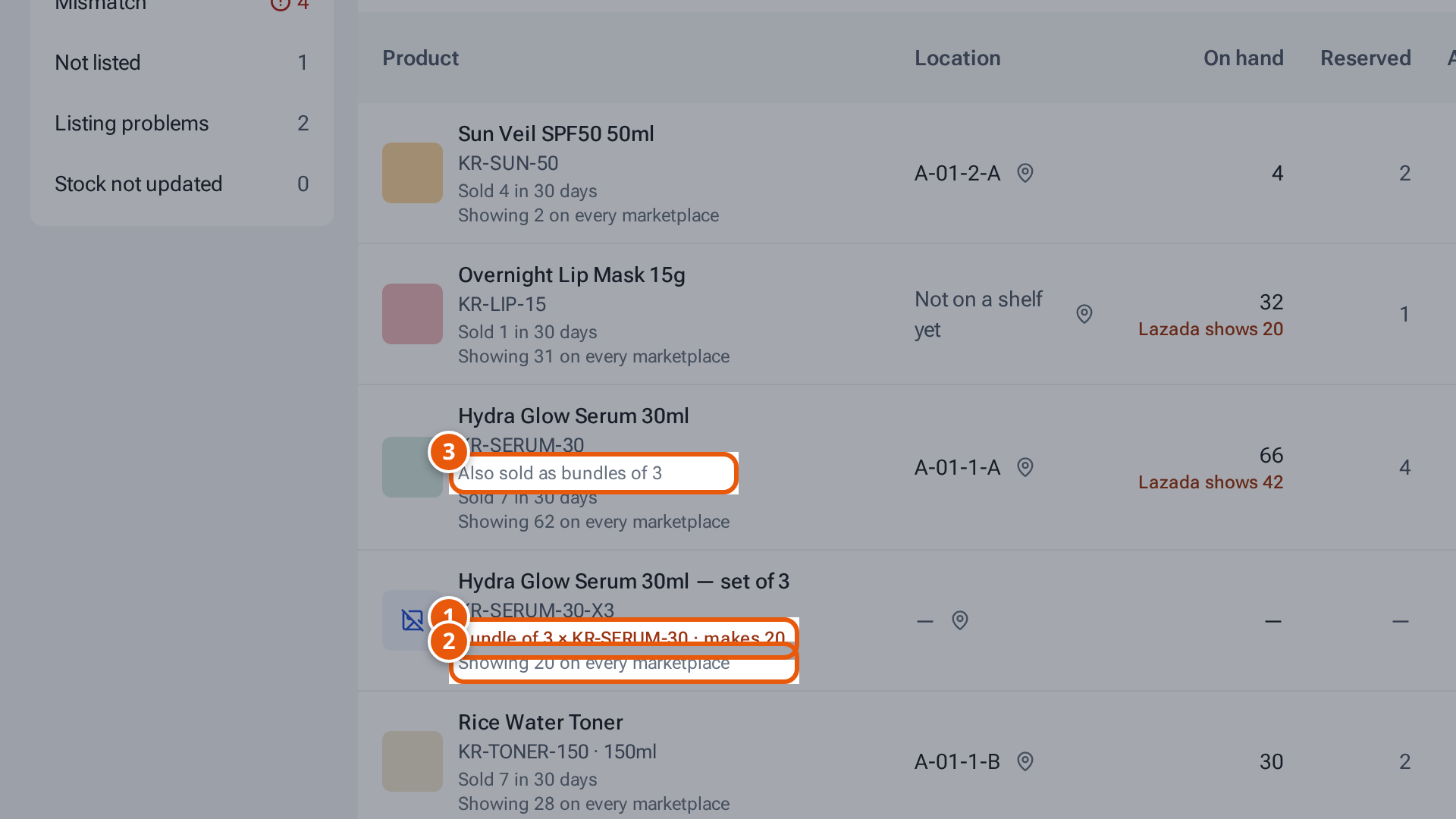
- 1. A bundle: three serums from the shelf, and how many sets they make.
- 2. What the bundle’s listings show.
- 3. The single item, also sold in bundles.
| What you see | What it means |
|---|---|
| “Bundle of 3 × KR-SERUM-30 · makes 20” | The bundle, and how many sets the free singles make. |
| “Showing … on every marketplace” | What the bundle’s listings show. |
| “Also sold as bundles of 3” | On the single item: it’s the base of a bundle. |
| “Marketplace update failing (… tries): … — retrying” | theopsroom couldn’t update a bundle’s listing yet and keeps trying. |
Change bundle changes the recipe. Remove bundle asks “Stop selling … as a bundle? It becomes a normal SKU with nothing on the shelves.”
If something goes wrong
Section titled “If something goes wrong”| Message | Why | What to do |
|---|---|---|
| A message tells you to ask the warehouse to set up bundles | Sellers can’t set up bundles here. | Ask your warehouse. |
| “Choose the base item” | No single item picked. | Type its seller SKU and click it. |
| “A bundle has 2 to 100 items” | — | Type a number from 2 to 100. |
| “Choose a single item from the same seller” | The base is another seller’s, or itself a bundle. | Pick one of your own single items. |
| A message says a bundle SKU has units in the warehouse and tells you to ask the warehouse to clear them first | The bundle SKU has stock on the shelves. | Ask your warehouse to clear it. |