

An order's details
Every order has a details window. It shows where the order is going, how far it has got, its parcels and tracking, and what’s in it.
- Open Orders and find the order (use the search box or the groups on the left).
- Click Details on its row (on a phone, tap the order, then Full details).
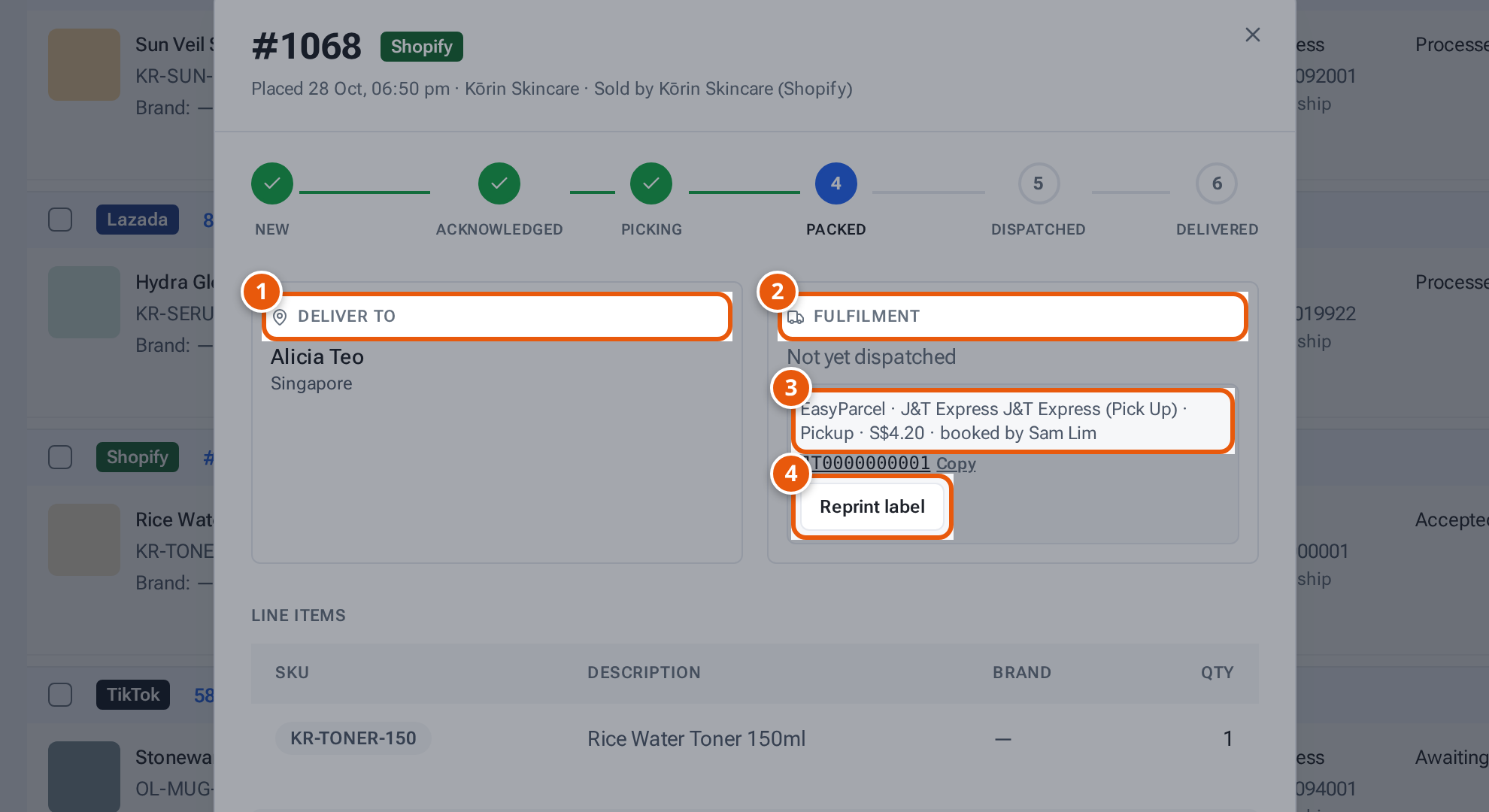
- 1. Who the parcel goes to.
- 2. The courier, tracking number and each parcel.
- 3. For a Shopify order: the courier theopsroom booked, its service and cost.
- 4. Reprint label: print the courier label again.
What the window shows
Section titled “What the window shows”| Part | What it tells you |
|---|---|
| Header | The order number, its marketplace, and badges such as “COD” or “Shop disconnected — no longer updating”. Under it: when it was placed, the seller and the shop. Open return shows when the order has a return. |
| Progress | New → Acknowledged → Picking → Packed → Dispatched → Delivered. A cancelled or returned order says “This order was cancelled.” or “This order was returned.” instead. |
| Deliver to | The buyer and their town. |
| Fulfilment | The courier and tracking number, and each parcel (“Package … · courier · tracking · Packed / Ready to ship”), or “Not yet dispatched”. |
| Courier booking (Shopify orders) | Who theopsroom booked (EasyParcel, or the seller’s own J&T account), the service, pickup or drop-off, the cost, and the tracking number with Copy. Staff see Reprint label. |
| Line items | SKU, description, brand and quantity. |
| Extra items | Gifts and extras added to the order; they can be changed while it’s New. |
| Order total | What the buyer paid. |
Notices you may see
Section titled “Notices you may see”- “Buyer asked to cancel on Shopee — accept or reject it above before packing”: see Answer a buyer’s cancellation request.
- “TikTok is holding this order — the buyer can still cancel. Pack it after the hold ends.”
- “No seller SKU in … for … — add one in … Seller Center”: the marketplace item has no seller SKU, so theopsroom can’t tell which product it is.
- “Replacement for #… — the buyer asked for a replacement”.
Related pages
Section titled “Related pages”- Sellers: Follow your orders
- Staff: Find and sync orders
- Admins: Change or cancel a courier booking