

Delete a client and all its data
When you stop working with a seller, you can delete the client and everything theopsroom holds for it. This can’t be undone. Nothing changes on the marketplaces: the seller’s shops and listings there stay as they are.
Before you start
Section titled “Before you start”- Disconnect every shop of the client on Shop Connections.
- Wait for any product import to finish.
- There must be at least one other client.
- Stock still on shelves: theopsroom stops tracking it. Hand it back to the seller first.
-
Open Admin → Clients and click the bin on the client’s row (on a phone: Remove).
-
The window “Delete … and all its data” counts what will go: shops, orders, returns, products, deliveries, upload batches, invoices, gift rules, gift lists and seller logins. Read it.
-
If a red line says what has to happen first, close the window, do it, and come back. There’s no delete button until then.
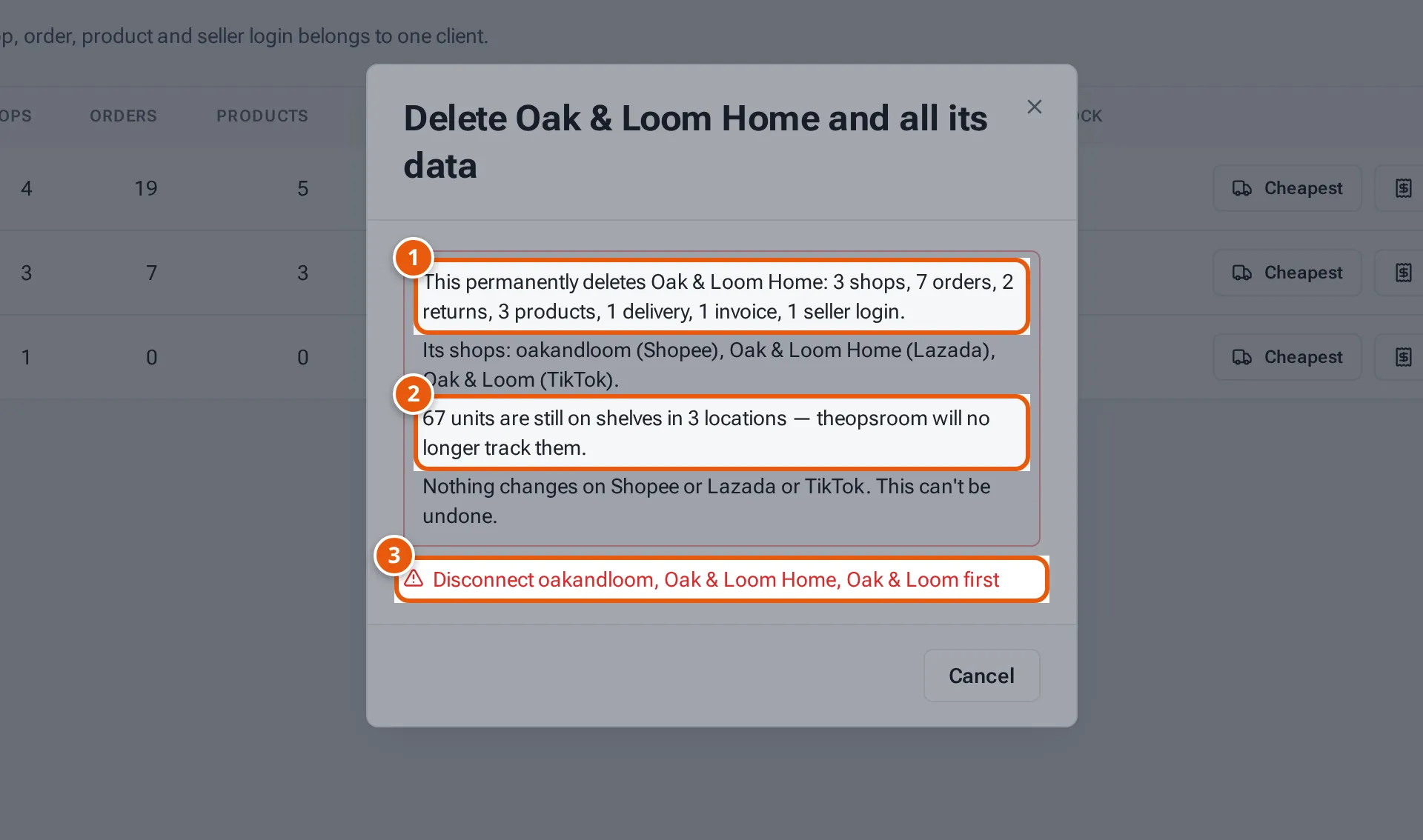
- 1. Everything that will be deleted, counted.
- 2. Stock still on shelves: theopsroom stops tracking it.
- 3. What has to happen first. Until then there’s no delete button.
Tap or click the picture to open it full size. -
Type the client’s name exactly in Type … to confirm.
-
Click Delete permanently. It shows Deleting…; a big seller can take a minute, so keep the page open.
-
When it’s done you see a message such as “Pebble & Co deleted: 1 shop.” The client is gone from the list.
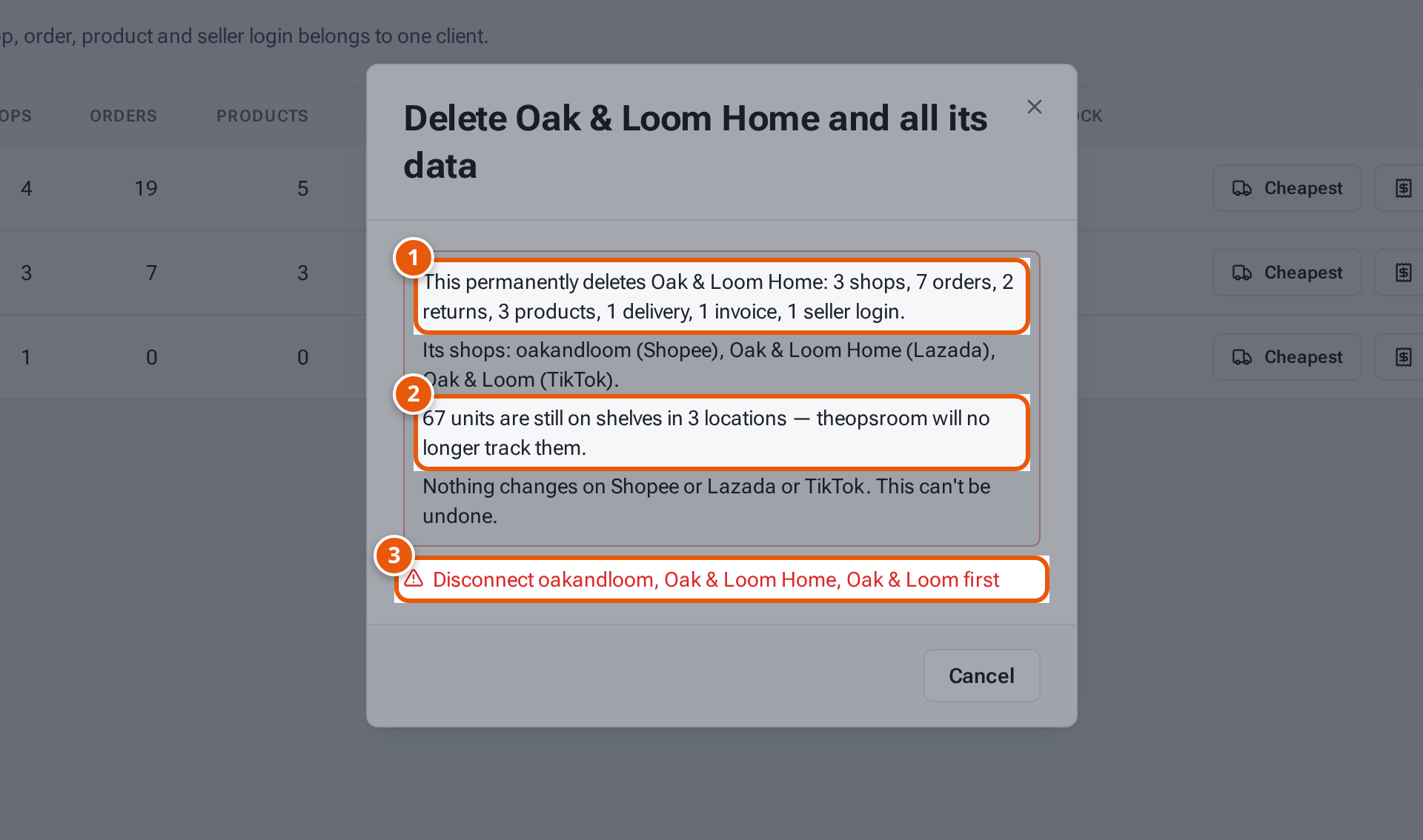
- 1. The shops on the marketplace stay as they are.
- 2. Type the client’s name exactly.
- 3. Delete permanently. It can’t be undone.
What the window tells you
Section titled “What the window tells you”| Line | What it means |
|---|---|
| “This permanently deletes …” | Everything that will be deleted, counted. |
| “Its shops: …” | The client’s shops, with their marketplace. |
| “… line(s) on other sellers’ deliveries will be removed.” | Lines for this seller’s products on other sellers’ deliveries go too. |
| “… listing(s) on other sellers’ shops will be removed.” | Listings of this seller’s products on other sellers’ shops go too. |
| “… bundle recipe(s) of other sellers will be removed.” | Other sellers’ bundles built on this seller’s items go too. |
| “… units are still on shelves in … locations — theopsroom will no longer track them.” | Stock left in the warehouse drops out of theopsroom. |
| “Nothing changes on …. This can’t be undone.” | The marketplaces aren’t touched. |
If something goes wrong
Section titled “If something goes wrong”| Message | Why | What to do |
|---|---|---|
| “… is your only seller — add another before removing it” | theopsroom needs at least one client. | Add another client first. |
| “Disconnect … first” | Some of its shops are still connected. | Disconnect them on Shop Connections. |
| “Wait for the product import to finish” | A product import is running. | Try again when it’s done. |
| “Type the name exactly to confirm” | The typed name doesn’t match. | Type it exactly, including capitals and symbols. |
| “Lost the connection while deleting. theopsroom may still be finishing — check again in a minute.” | Your connection dropped. | Wait a minute and reload Clients. |