

Guided picking
With a floor plan, theopsroom works out the shortest walk to collect an order: from your pack bench, to each shelf, and back. It shows one stop at a time.
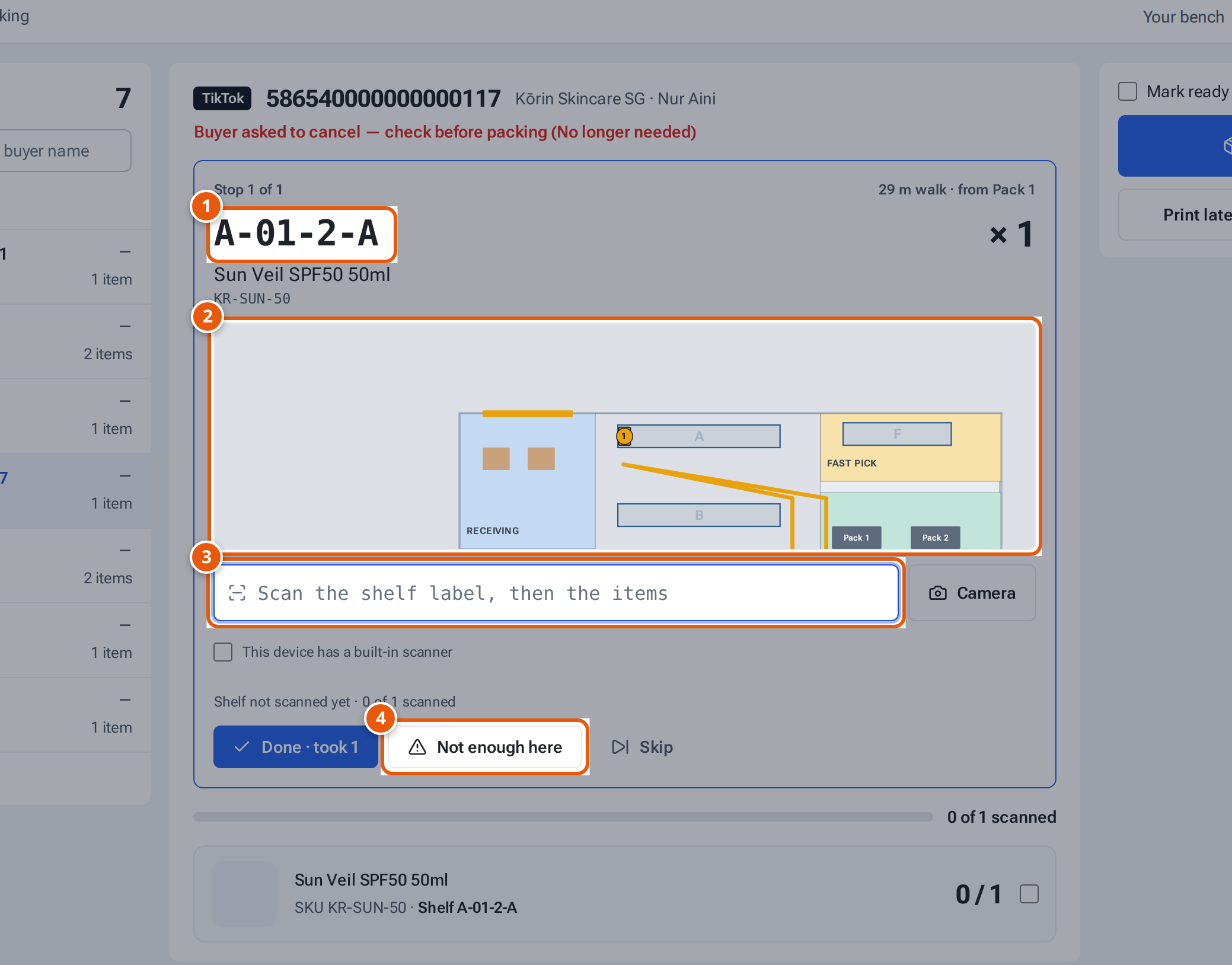
- 1. The shelf to go to, with the item and how many to take.
- 2. The route from your bench, with the shelf marked.
- 3. Scan the shelf label, then each item.
- 4. Fewer here than needed: theopsroom sends you to the next shelf.
Pick one order at Pick & Pack
Section titled “Pick one order at Pick & Pack”- Open Pick & Pack. Under the order, choose Your bench (once per device; theopsroom remembers it).
- Press Start pick. The first stop shows the shelf code in large letters, the item, how many to take, and a small map with the route.
- At the shelf, scan the shelf label, then the items. Each item you scan also counts for packing.
- Wrong shelf? theopsroom says which shelf you scanned and where to go.
- If the seller doesn’t ask for scanning, press Done · took 2 instead.
- The next stop appears by itself. After the last one: “All picked · back to Pack 2”. Press Finish the pick.
- Pack as usual. The stock comes off the shelves you scanned.
If you leave the order and open it again, the pick carries on where you stopped.
Several orders in one walk
Section titled “Several orders in one walk”- In Orders, tick the orders and press Pick list.
- Press Walk route. A walk opens for all of them, from your bench.
- Each stop says which tote the items go in (“Tote B · #1045”). Keep one tote per order.
- When the walk is done, pack each order at Pick & Pack.
When a shelf is short
Section titled “When a shelf is short”Press Not enough here and type how many you found. theopsroom:
- sends you to the next shelf that has the rest (it’s added to the walk), or says the rest comes off “Not on a shelf yet” at packing when no other shelf has it;
- marks the shelf count needed, so someone recounts it.
Press Skip to leave a stop and pick it by hand later.
Which shelf theopsroom picks from
Section titled “Which shelf theopsroom picks from”When an item is on several shelves, theopsroom takes it from the shelf closest to packing that has enough. Items another packer is already picking aren’t counted, so two people are never sent for the same last units.
If something goes wrong
Section titled “If something goes wrong”| Message | Why | What to do |
|---|---|---|
| “Being picked by Sam” | Someone else has started a walk for this order. | Let them finish, or pack another order. |
| “That’s B-04-1-A — go to A-06-3-B” | You scanned another shelf’s label. | Go to the shelf shown. |
| “Scan the shelf label first” | The seller wants every shelf and item scanned. | Scan the shelf’s label, then the items. |
| No Start pick button | There’s no floor plan, or no pack bench on it. | Ask an admin to publish a floor plan with pack benches. |