

Gift rules
A gift rule adds free gifts to the orders that match it: from certain shops or marketplaces, placed between two dates, above an order value, with certain products, and so on. Gifts follow the rules until the order is packed, so a change to a rule updates the orders still waiting. Each gift is one of your products, so it’s picked, packed and taken off your stock.
Before you start
Section titled “Before you start”The gift must be one of your products, with stock in the warehouse. (For a monthly sheet of rules, see Your monthly gift rules sheet.)
- Open Products → Gift rules and click New rule.
- 1 · Basics: give it a Rule name. Priority decides the order rules run in (lower numbers first). Choose Stackable (add these gifts and keep checking rules below) or Exclusive (only this rule’s gifts; rules below are skipped).
- 2 · Which orders: click the conditions you need, such as + Shops, + Marketplace, + Order placed between, + Order amount or + Contains products, and fill them in. An order gets gifts only when it matches every condition. With none, every order gets them.
- 3 · Gifts: set Tier 1’s threshold (for example an order amount of at least S$50) and click + Add gift to pick the gift and its quantity. Add more tiers to give more as the order grows.
- 4 · Limits and stock: optionally stop after a number of orders, choose what happens when a gift is out of stock, and add a Note for packers.
- Read In plain words on the right to check the rule says what you mean. Click Try it to run it on the last 7 or 30 days of orders. Nothing changes.
- Click Save rule. Orders still waiting to be packed get their gifts.
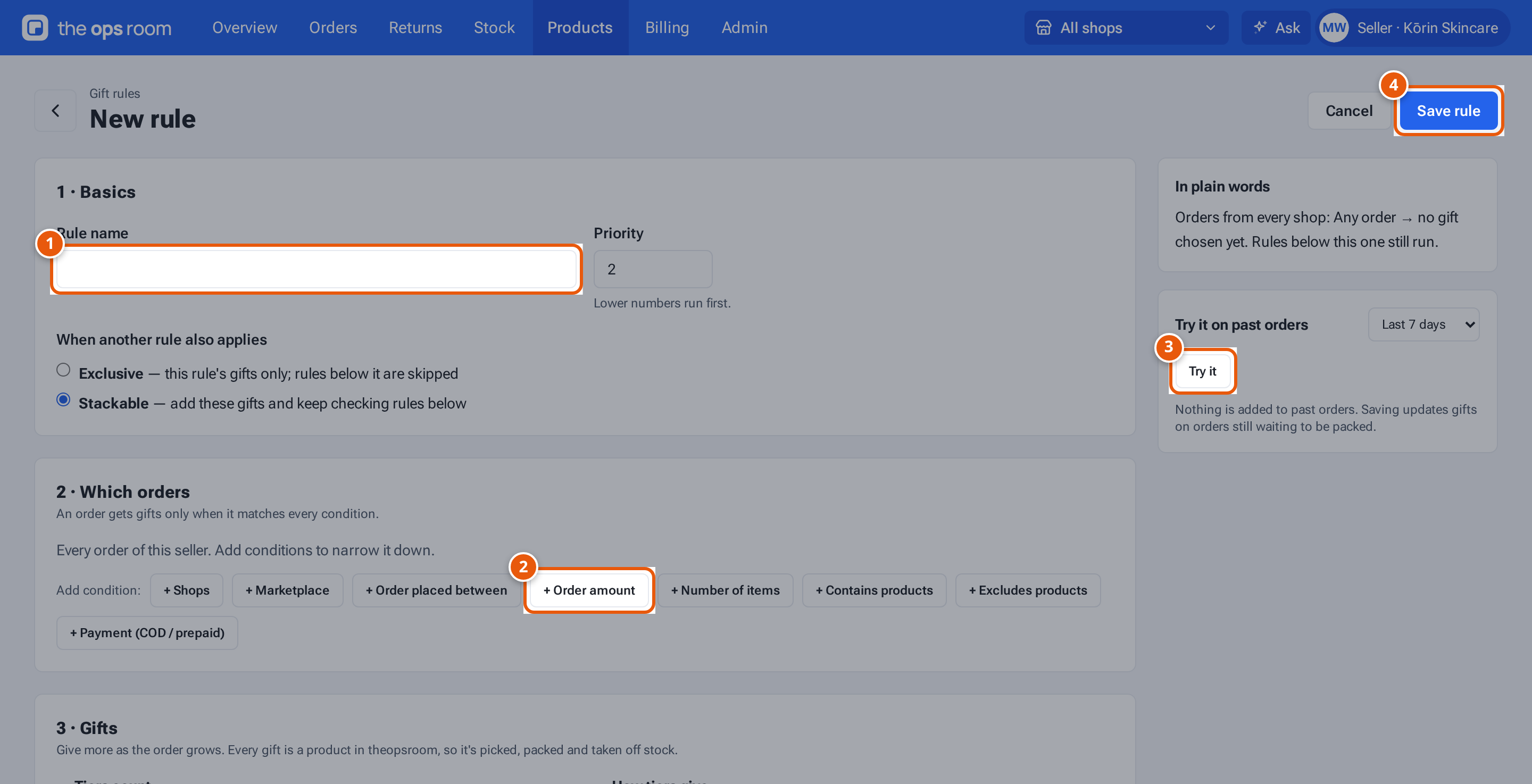
- 1. A name you’ll recognise.
- 2. Add conditions: only orders that match all of them get the gift.
- 3. Try the rule on past orders. Nothing changes.
- 4. Save it. Orders waiting to be packed get their gifts.
The rules list
Section titled “The rules list”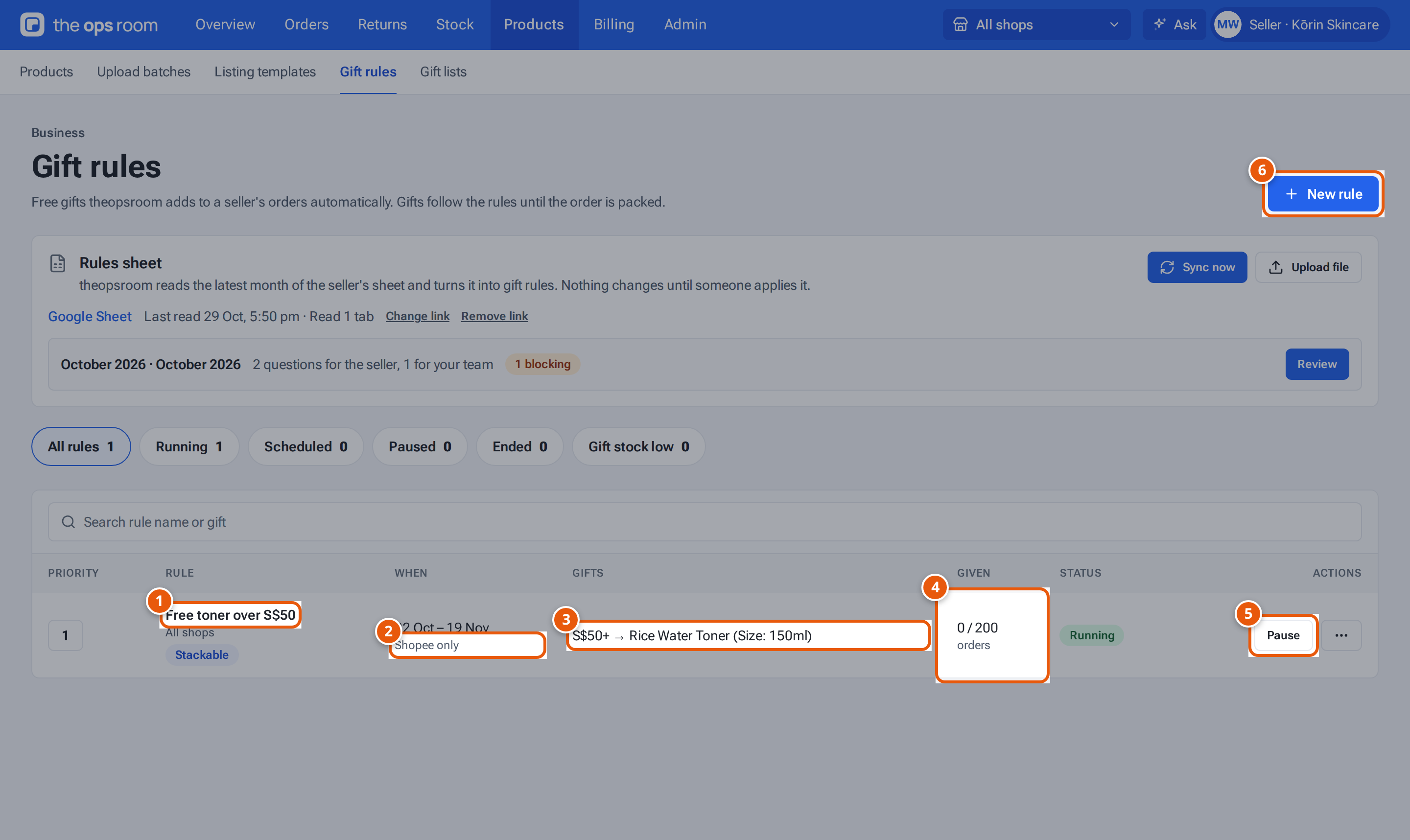
- 1. A rule. Click it to open it.
- 2. When it runs, and which orders it’s for.
- 3. The gift, from an order value of S$50.
- 4. How many orders got it, out of the limit.
- 5. Pause it; Resume starts it again.
- 6. Make a new rule.
| Item | What it does |
|---|---|
| Quick filters | Running, Scheduled, Paused, Ended, Gift stock low. |
| When | The dates, and other conditions such as “Shopee only”. |
| Gifts | Each tier, such as “S$50+ → Rice Water Toner”. |
| Given | Orders that got the gift, out of the limit. |
| Status | Running, Scheduled, Paused or Ended (the end date passed or the limit was reached). “Stock low: …” warns that a gift is running out. |
| Pause / Resume | Stop or restart it. Gifts on waiting orders are rechecked. |
| ⋯ | Edit, Copy (a paused copy), Change history, Orders given gifts, Delete. |
Deleting asks “Delete “…”? Its gifts come off … waiting order(s); packed orders keep theirs.”
What the gift choices mean
Section titled “What the gift choices mean”| Choice | What it does |
|---|---|
| Highest tier reached | Only the top tier’s gifts. |
| Every tier reached | Gifts from every tier add up. |
| For every… | Repeat one tier, e.g. one gift per S$85. Most per order caps it. |
| Give all of these / the first one in stock / one at random | How a tier with several gifts gives them. |
| When a gift is out of stock | Leave it out (packed without it, noted on the order) or Add it anyway (packing records it short). |
Order amount means the items after discounts, without shipping.
If something goes wrong
Section titled “If something goes wrong”| Message | Why | What to do |
|---|---|---|
| “Name the rule” | — | Type a name. |
| “Tier …: add a gift” | A tier has no gift. | Click + Add gift. |
| “Tier … must be higher than tier …” | Tiers must go up. | Raise the later tier’s threshold. |
| “The end time must be after the start time” | — | Fix the dates. |
| “… must be a number — no commas or symbols” | You typed “S$50” or “1,000”. | Type just the number. |
| “A seller can have at most 100 gift rules” | — | Delete rules you don’t need. |