

Marketplace stock follows the warehouse
With Marketplace stock follows the warehouse on, every listing of the seller on every marketplace shows the units the warehouse can pack: what’s on the shelves, less units promised to orders not packed yet, less the buffer. theopsroom updates them after every order, delivery and stock change, usually within a minute. It’s set per client.
Before you start
Section titled “Before you start”- Count the seller’s stock in (see Receive a delivery) or set it with Force import stock. The marketplaces will show what theopsroom has.
Switch it on
Section titled “Switch it on”- Open Admin → Clients and turn on the Marketplace stock switch on the client’s row.
- The window “Marketplace stock follows the warehouse · …” opens. theopsroom reads each marketplace (it says “Reading each marketplace…”) and lists what would change, e.g. “3 listings change · 32 units down · 1 couldn’t be read”.
- Set the Buffer (units held back) if you want: each listing shows that many fewer.
- Click Switch on. You see “…’s marketplaces now follow the warehouse.” Nothing is sent before this.
Change the buffer
Section titled “Change the buffer”- Click Buffer next to the switch (it shows the current number, e.g. Buffer 0).
- Change the number and click Save buffer. You see “…’s buffer is now …”.
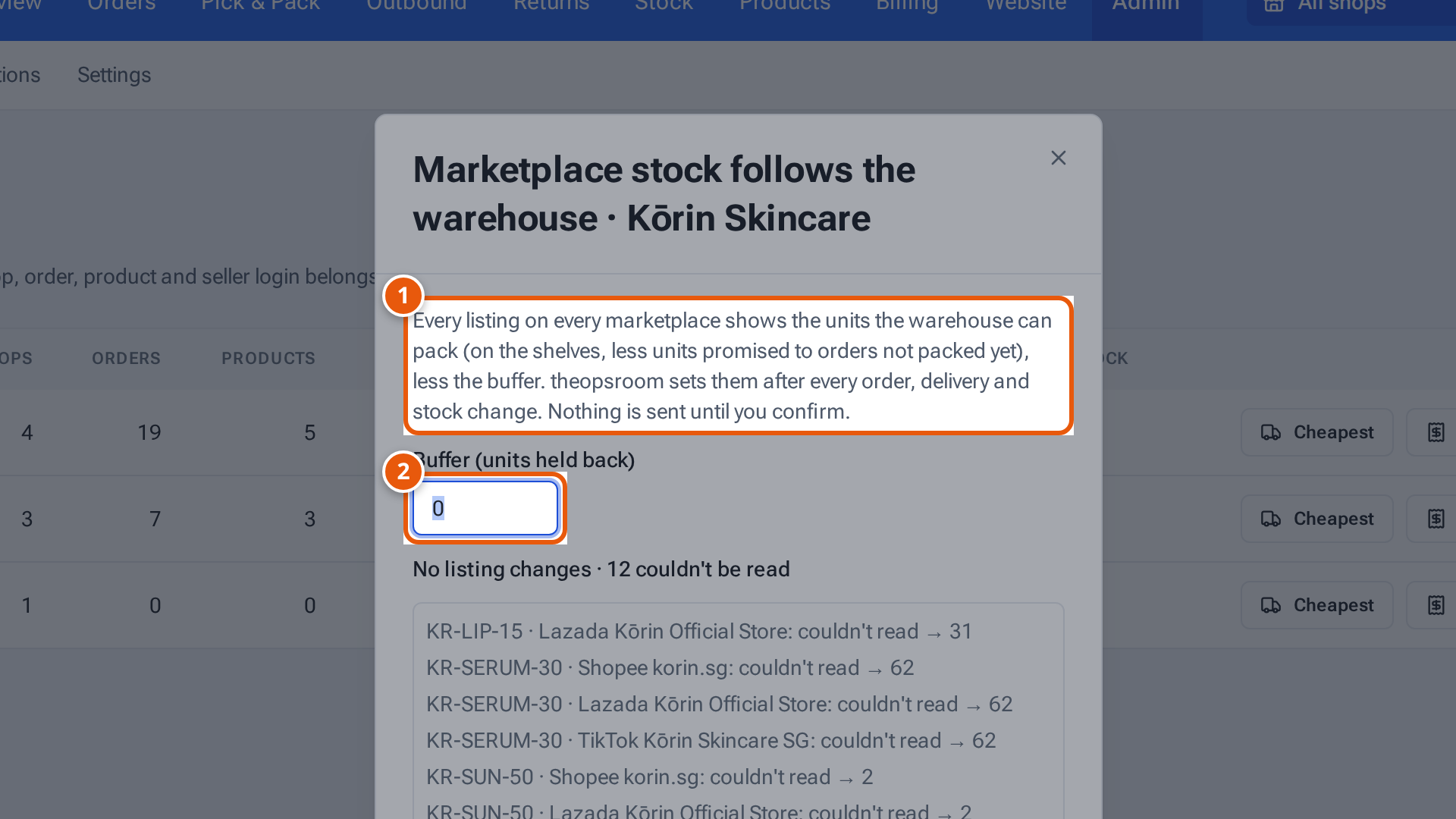
- 1. What every listing will show.
- 2. Units held back from every listing (0 to 99).
Switch it off
Section titled “Switch it off”Turn the switch off. It happens at once: “…’s marketplaces keep what they show; theopsroom stops setting them.”
What changes when it’s on
Section titled “What changes when it’s on”- On Inventory, each SKU shows “Showing … on every marketplace”. The seller sees “Your marketplace stock follows the warehouse”.
- Bundles show what the base item’s free units make (see Set up bundles).
- New listings on TikTok, Shopee and Shopify start with the free units.
When it’s off, warehouse changes are sent to Lazada as plus or minus changes, and the stock record follows packing. See Find, adjust and move stock.
What each button and field means
Section titled “What each button and field means”| Item | What it means |
|---|---|
| Marketplace stock switch | On: theopsroom sets every listing’s stock. Off: the marketplaces keep what they show. |
| Buffer (units held back) | 0 to 99 units held back from every listing, e.g. to cover stock sold elsewhere. |
| “… couldn’t be read” | theopsroom couldn’t read what the listing shows on the marketplace now, so the preview can’t say whether it changes. |
| Switch on / Save buffer | Confirm. Nothing changes before you click it. |
If something goes wrong
Section titled “If something goes wrong”| Message | Why | What to do |
|---|---|---|
| “The buffer is 0 to 99 units” | The buffer is out of range. | Enter 0 to 99. |
| “No listings on any marketplace yet.” | The seller has nothing listed. | Switch on anyway; new listings will follow. |
| Inventory’s Mismatch tile counts a SKU | A listing isn’t showing its number, or setting it failed. | Open the SKU’s stock window to see why. |