

Your shops
Shop Connections lists your Lazada, TikTok Shop, Shopee and Shopify shops that your warehouse has connected to theopsroom. Connected shops send their orders to theopsroom about every 5 minutes (and straight away when the marketplace sends a change), and theopsroom looks after their listings and stock.
- Open Admin → Shop Connections. (On a phone, tap More, then Shop Connections.)
- Read each shop’s Status and Last sync. The filters at the top (Connected, Needs reconnecting, Needs attention, Disconnected) show only those shops.
- Click a shop’s name to see its details: its last order sync, the last order pushed by the marketplace, its last product import, and when it was connected.
- To bring a shop’s products into theopsroom, click ⋯ → Import products. See Import products from a shop.
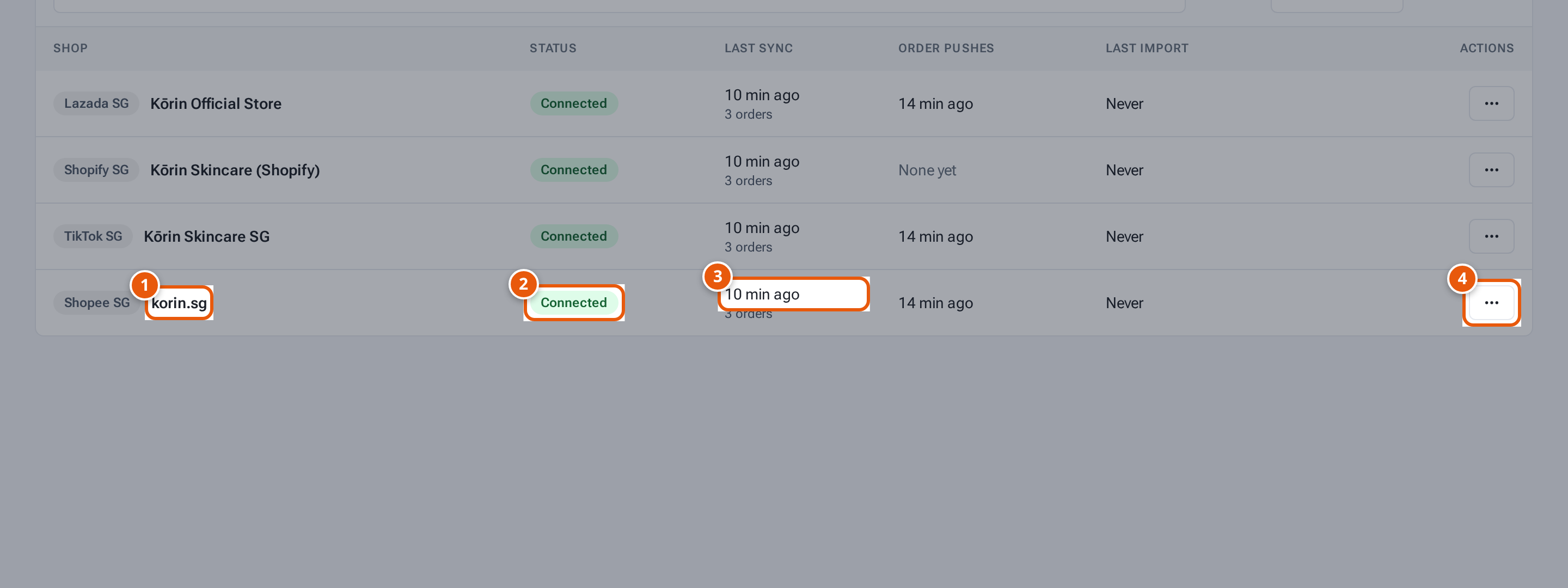
- 1. A shop. Click it for its details.
- 2. Connected: theopsroom reads its orders and looks after its listings.
- 3. When theopsroom last read its orders.
- 4. Import products from this shop.
What each status means
Section titled “What each status means”| Status | What it means | What to do |
|---|---|---|
| Connected | theopsroom reads its orders and looks after its listings. | Nothing. |
| Needs reconnecting | The marketplace stopped theopsroom’s access (for example after a password change). | Ask your warehouse to reconnect it. You may need to approve it on the marketplace’s own page. |
| Disconnected | Syncing has stopped. Its orders stay in theopsroom. | Ask your warehouse if this is a surprise. |
| “Shopee access ends on … — Reconnect to extend” | Shopee’s permission runs out on that date. | Ask your warehouse to reconnect before then. |
| “Needs attention” | The last sync or import failed, or the import has problems. | Open the shop to read why. |
To add a new shop, ask your warehouse: they start the connection and you approve it on the marketplace’s page.
Your courier settings
Section titled “Your courier settings”Your preferred courier, delivery notifications and own courier accounts are on the Shipping page (Admin → Shipping settings). See Your shipping settings.