

Settings: Products & orders (AI, bundles, gift lists)
Admin → Settings → Products & orders has three cards: AI writing, Bundles and Gift lists.
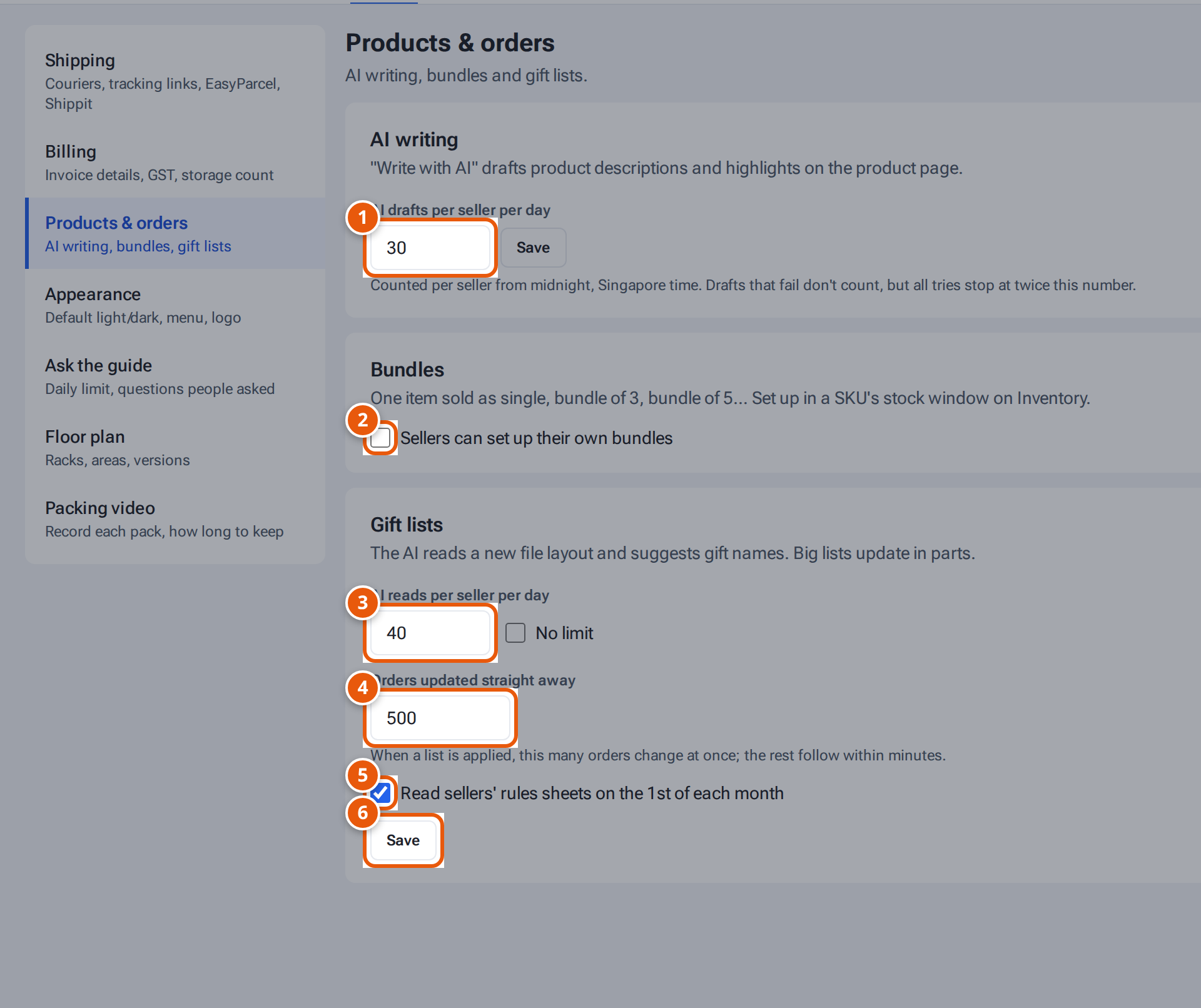
- 1. How many “Write with AI” drafts each seller may make a day.
- 2. Let sellers set up bundles for their own SKUs. Saves at once.
- 3. How often the AI may read a seller’s new gift-list file layout.
- 4. How many orders change at once when a gift list is applied.
- 5. Read each seller’s gift rules sheet on the 1st of the month.
- 6. Save the gift list settings.
AI writing
Section titled “AI writing”“Write with AI” drafts product descriptions and highlights on the product page (see Write a description with AI). The card shows On, or that it’s off. If it’s off, ask whoever runs your hosting to switch it on.
- Set AI drafts per seller per day (1 to 500; default 30).
- Click Save. You see “Sellers can now make … AI drafts a day.”
Drafts are counted per seller from midnight, Singapore time. Drafts that fail don’t count, but all tries stop at twice this number. A seller who reaches the limit sees “You’ve used today’s … AI drafts — more tomorrow”.
Bundles
Section titled “Bundles”Tick Sellers can set up their own bundles to let sellers set up bundles for their own SKUs. It saves as soon as you tick or untick it: “Sellers can now set up bundles for their own SKUs.” or “Only admins set up bundles now.” See Set up bundles.
Gift lists
Section titled “Gift lists”The AI reads a new gift-list file layout and suggests gift names. Big lists update in parts.
- Set AI reads per seller per day (1 to 500; default 40), or tick No limit.
- Set Orders updated straight away (50 to 5,000; default 500): when a list is applied, this many orders change at once and the rest follow within minutes.
- Tick or untick Read sellers’ rules sheets on the 1st of each month (on by default).
- Click Save. You see e.g. “Gift lists: 40 AI reads per seller a day; 500 orders update straight away.”
See Gift lists and Your monthly gift rules sheet.
If something goes wrong
Section titled “If something goes wrong”| Message | Why | What to do |
|---|---|---|
| “Enter a whole number from 1 to 500.” | The AI drafts number is out of range. | Enter 1 to 500. |
| “AI reads: a whole number from 1 to 500, or tick No limit.” | The AI reads number is out of range. | Enter 1 to 500, or tick No limit. |
| “Orders updated straight away: a whole number from 50 to 5,000.” | Out of range. | Enter 50 to 5,000. |