

Your monthly gift rules sheet
If you plan your gifts in a monthly spreadsheet, theopsroom can read it. It reads the latest month, turns it into gift rules, and lists anything it isn’t sure about as questions. Nothing changes until someone applies it.
Before you start
Section titled “Before you start”- Keep the sheet in Google Sheets and share it so theopsroom can open it: Share → General access → “Anyone with the link” (Viewer), or share it with the email shown on the card. Or save it as .xlsx or .csv and upload it.
- If the warehouse has switched it on, theopsroom reads linked sheets by itself on the 1st of each month.
- Open Products → Gift rules. The Rules sheet card is at the top.
- Paste the Google Sheets link and click Save link. (Or click Upload file and choose the .xlsx or .csv.)
- Click Sync now to read it now. A new read opens as a draft. If nothing changed you see “No changes since the last read”.
- On the draft, read What changed, then answer the Questions. Those For the seller are for you: click the right answer. Blocking ones must be answered before the rules can be applied.
- Check Rules it will create.
- Click Apply … rule(s), or ask your warehouse to apply it. The sheet’s rules replace last read’s; rules you made by hand stay.
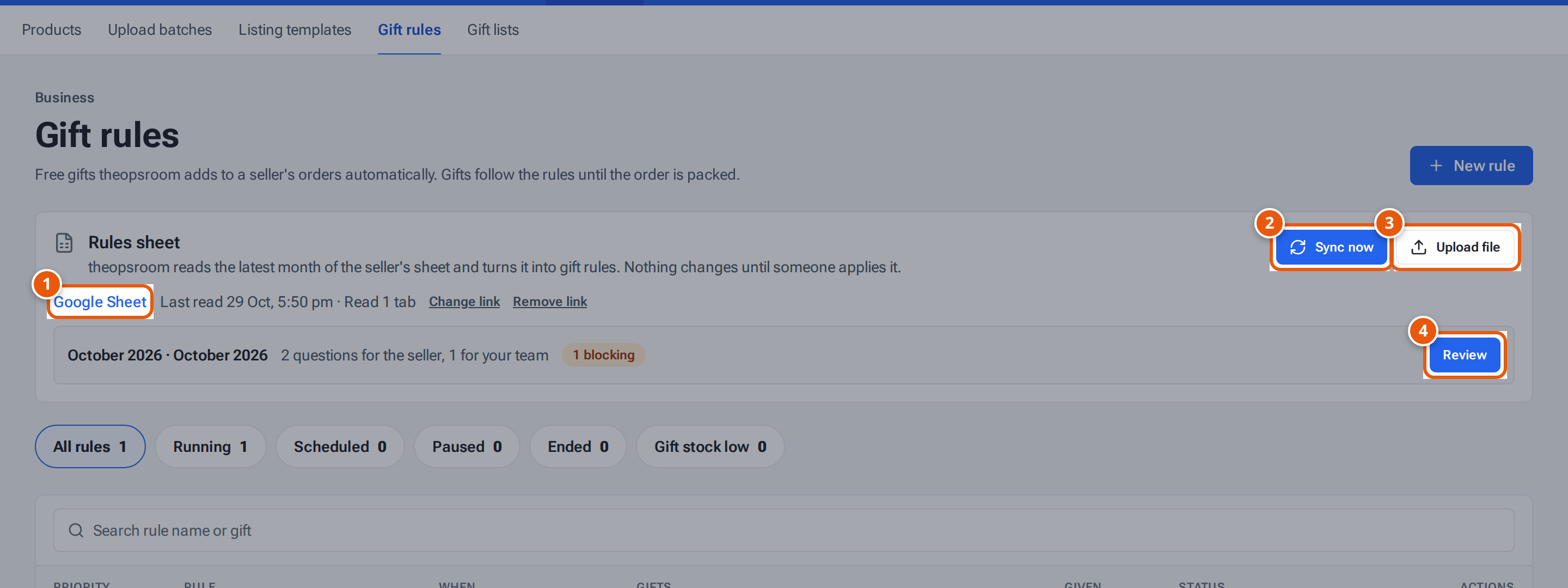
- 1. Your linked Google Sheet, and when theopsroom last read it.
- 2. Read the sheet now.
- 3. Or upload the sheet as a file (.xlsx or .csv).
- 4. A read waiting to be checked: open it to answer its questions.
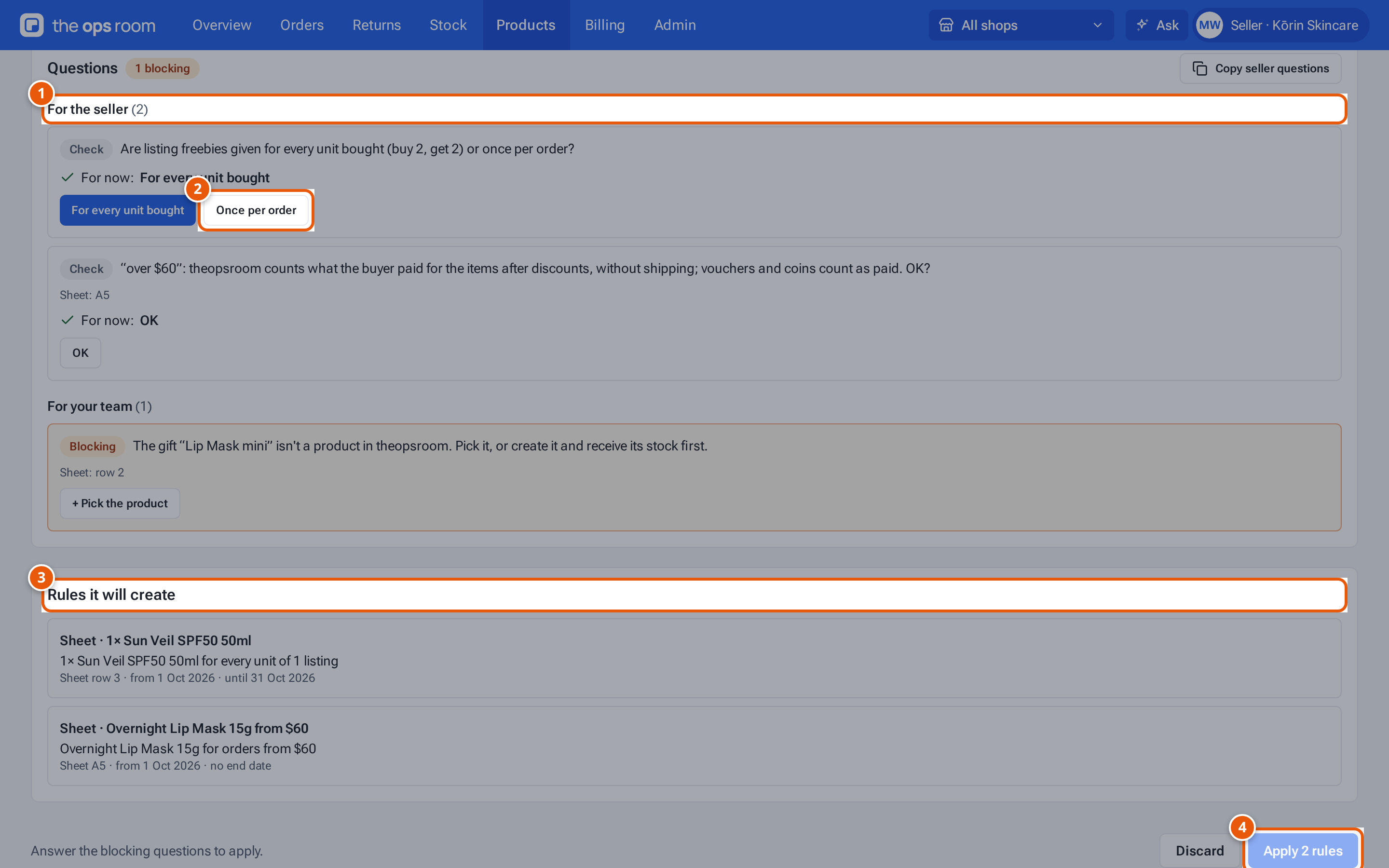
- 1. Questions for you: tap the right answer.
- 2. An answer. theopsroom remembers it next month.
- 3. The gift rules this read will make.
- 4. Apply them once the blocking questions are answered.
What each button and field means
Section titled “What each button and field means”| Item | What it does |
|---|---|
| Sync now | Read the linked sheet now. |
| Upload file | Read an .xlsx or .csv (up to 5 MB) instead. |
| Change link / Remove link | Use another sheet, or stop reading it (“Rules already made stay”). |
| Review | Open the draft waiting to be checked. |
| Month’s tab | Read another tab of the sheet. |
| Check / Blocking | A question to look at, or one that must be answered first. |
| “For now: …” | What theopsroom will do unless you choose otherwise. Undo clears an answer. |
| Copy seller questions | Copies the questions as text, to send on. |
| Rows ignored | Rows theopsroom skipped, and why (e.g. “empty”, “no gift”). |
| Discard | Throw this read away. “Nothing changes in the rules.” |
theopsroom remembers your answers for next month.
If something goes wrong
Section titled “If something goes wrong”| Message | Why | What to do |
|---|---|---|
| A message says the app can’t open this sheet and tells you to choose Share → General access → “Anyone with the link” (Viewer) in Google Sheets, or to share it with the reader address it shows | The sheet is private. | Share it as the message says. |
| “Answer the blocking questions to apply.” | A blocking question is open. | Answer it, or ask your warehouse to answer “For your team” ones. |
| A message says AI reading isn’t set up, so rules sheets can’t be read yet | — | Ask your warehouse. |
| “Today’s AI reads for this seller are used up — try again tomorrow” | — | Try tomorrow. |
| “The sheet is bigger than 5 MB” / “The file is bigger than 5 MB” | — | Remove old tabs, or split it. |
| “This draft was replaced by a newer read” | A newer read exists. | Open the newer one with Review. |