

Listing templates
A listing template holds one shop’s category and the default details for a group of similar products (for example all your serums on Shopee). When you publish, a template fills the category and details in one click, so each product only needs its own information. The brand always comes from the product.
Steps: make a template
Section titled “Steps: make a template”- Open Products → Listing templates and click New template.
- Give it a Name (for example “Polo shirts”) and choose the Shop.
- Search for the Category and pick it.
- Fill in the details every product in this group shares.
- Under “Variations — your variation name → marketplace property”, match your variation names (such as Colour) to the marketplace’s properties. Use Add variation for more.
- Click Save template. You see “Template “…” saved.”
You can also save a template straight from the Publish window with Save as template.
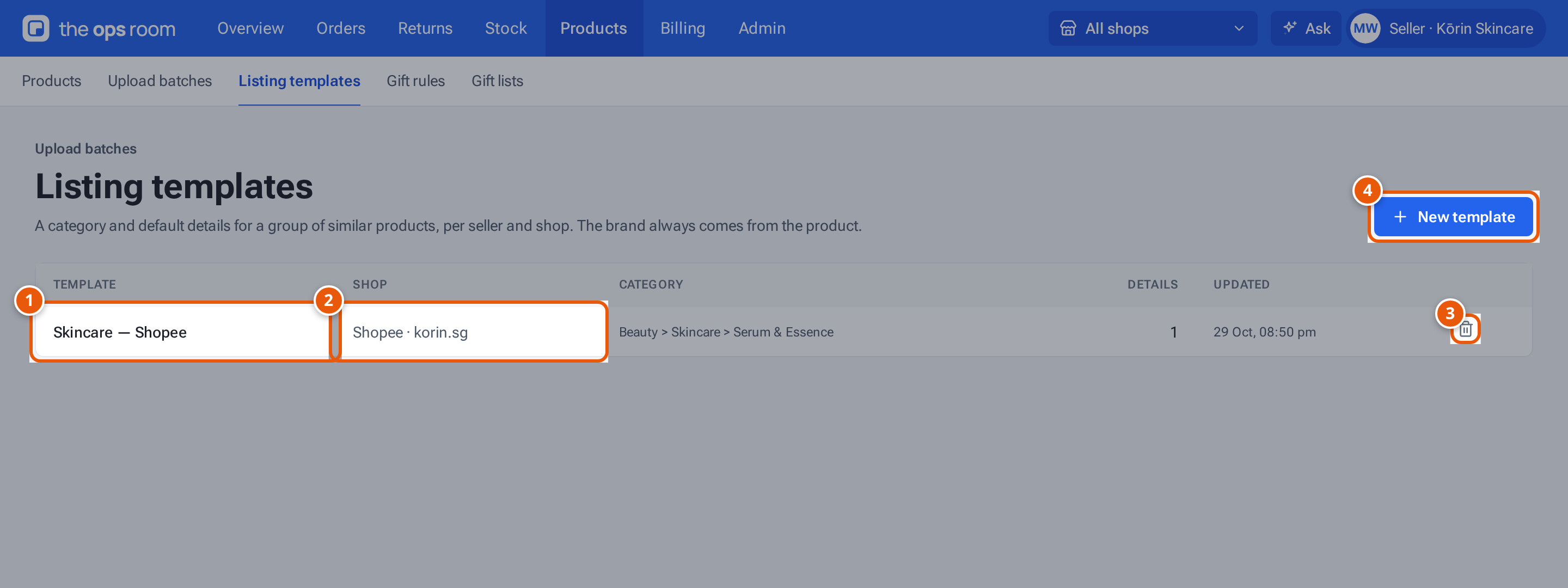
- 1. A template: one shop’s category and default details. Click it to edit.
- 2. The shop it’s for.
- 3. Delete it. Drafts it filled keep their answers.
- 4. Make another.
Use a template
Section titled “Use a template”- In the Publish window, click the template’s name under “Start from a template”.
- Once you pick a category you have a template for, click Fill blanks from …. It fills only empty details.
- In an upload batch, tick products and click Apply template…. See upload batches.
What each button and field means
Section titled “What each button and field means”| Item | What it does |
|---|---|
| Table row | Click it to change the template. The shop can’t change. |
| Details | How many details it fills. |
| Bin | Delete it: “Delete the template “…”? Drafts it filled keep their answers.” |
The list follows the shop chosen at the top of the screen.
If something goes wrong
Section titled “If something goes wrong”| Message | Why | What to do |
|---|---|---|
| “This seller already has a template called “…” for that shop” | The name is taken for that shop. | Choose another name. |
| “Give the template a name (up to 80 characters)” | The name is empty or too long. | Type a shorter name. |
| “Choose a category from the list” | No category picked. | Search and pick one. |
| New template is greyed out | You have no shop that can list products. | Ask your warehouse to connect a shop. |