

Connect a Shopify store
Connecting a seller’s Shopify store lets theopsroom bring in its orders, keep its stock right and send tracking numbers back to Shopify. When the store owner approves theopsroom, theopsroom adds itself to the store as a fulfilment service with its own location. In Shopify you will see it as the fulfilment location the app created.
Before you start
Section titled “Before you start”- You need the store’s address ending in .myshopify.com (e.g. korin.myshopify.com).
- The store owner (or someone who can approve apps for the store) must approve theopsroom on Shopify’s page.
-
Open Admin → Shop Connections and click Connect shop.
-
Under Marketplace, choose Shopify.
-
Type the Store address, e.g. their-store.myshopify.com.
-
Choose the client the store is for, or + New client and type the Client name.
-
Click Continue to Shopify. Your browser goes to Shopify.
-
The store owner approves theopsroom there.
-
Shopify sends you back to Shop Connections. A green banner says “Shopify shop connected. Importing the last 30 days of orders…” The store’s name comes from Shopify.
-
In Shopify, put the products theopsroom stocks at the fulfilment location theopsroom created. Only those are fulfilled by theopsroom.
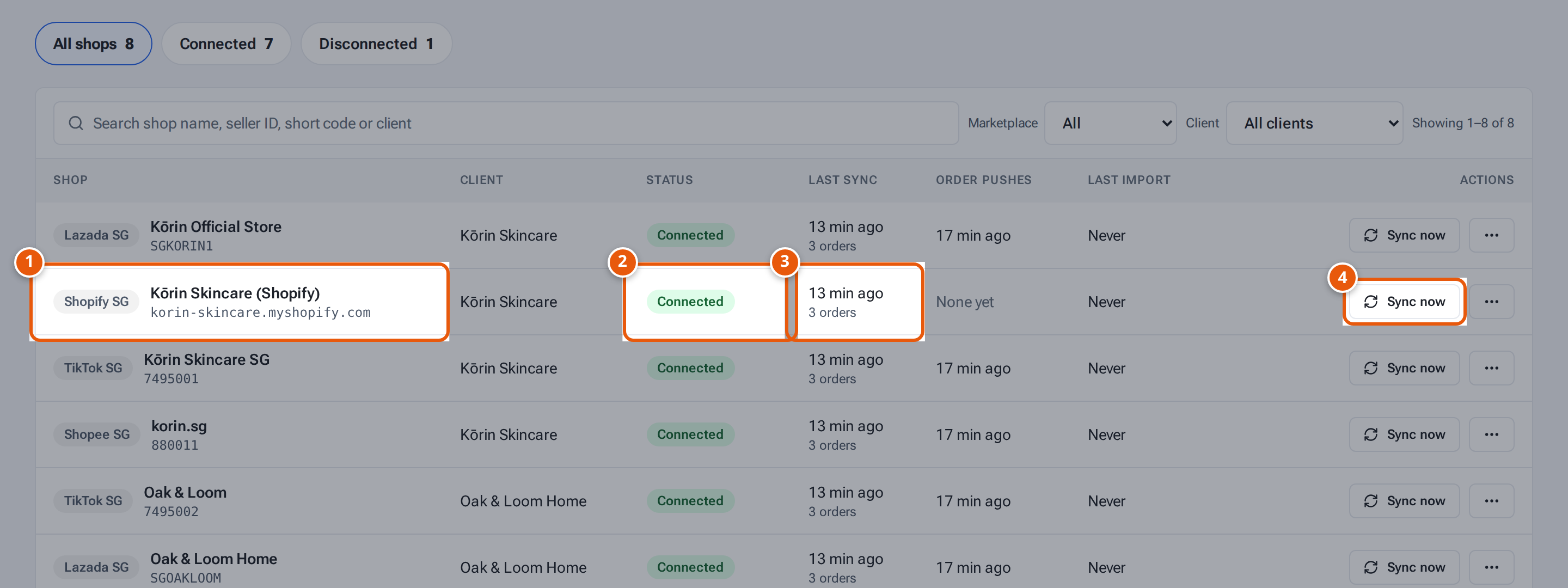
- 1. The shop, with the marketplace and country. Click its name to see its details.
- 2. Connected: theopsroom brings in its orders every 5 minutes.
- 3. When orders were last brought in, and how many.
- 4. Bring in new orders now instead of waiting.
Shopify orders are shipped with a courier chosen at Pick & Pack: EasyParcel, Shippit, the seller’s own J&T or Shippit account, a label the seller uploaded, or another courier. Set the seller’s preferred courier and their own courier login in their Courier window on Add and edit clients.
What each button and field means
Section titled “What each button and field means”| Item | What it means |
|---|---|
| Store address | The store’s .myshopify.com address (not its own web domain). |
| Client | Who the store belongs to. |
| Continue to Shopify | Go to Shopify. Greyed out until you type the store address and choose a client. |
| Reconnect | Later, approve again. theopsroom reuses the store address. |
If something goes wrong
Section titled “If something goes wrong”| Message | Why | What to do |
|---|---|---|
| “Enter the store’s myshopify address, e.g. korin.myshopify.com” | The address isn’t a .myshopify.com address. | Find it in the store’s Shopify admin and type that. |
| “Shopify isn’t set up yet (missing app keys)” | The Shopify app keys aren’t on the server. | Ask whoever runs your hosting. |
| “Shopify’s answer could not be verified — nothing was connected. Click Connect shop again.” | The reply from Shopify didn’t check out. | Start again. |
| “The store was approved, but theopsroom couldn’t finish setting it up in Shopify. Click Connect shop again.” | Setting up the fulfilment location failed. | Start again. |
| “Connection cancelled on the marketplace — nothing was connected.” | The approval was cancelled. | Click Connect shop again. |
| “This shop already belongs to another client. Use Move to client to change it.” | The store is connected for another client. | Use Move shops to another client. |
What theopsroom asks permission for
Section titled “What theopsroom asks permission for”theopsroom asks the Shopify store for these permissions: fulfilment orders assigned to theopsroom and to other fulfilment services (read and update: accept requests, mark them fulfilled, cancel), fulfilments (read and create, with the courier and tracking number), locations (read), products (read and update, and publishing them to the store’s sales channels), inventory (read and update), orders (read), and returns (read, approve, decline and refund).