

Manage users (roles, reset links, disable, delete)
Admin → Users lists everyone who can sign in: their role, how they sign in (Password, Google or both), whether they’re Active or Disabled, and their last login. Only admins can open it.
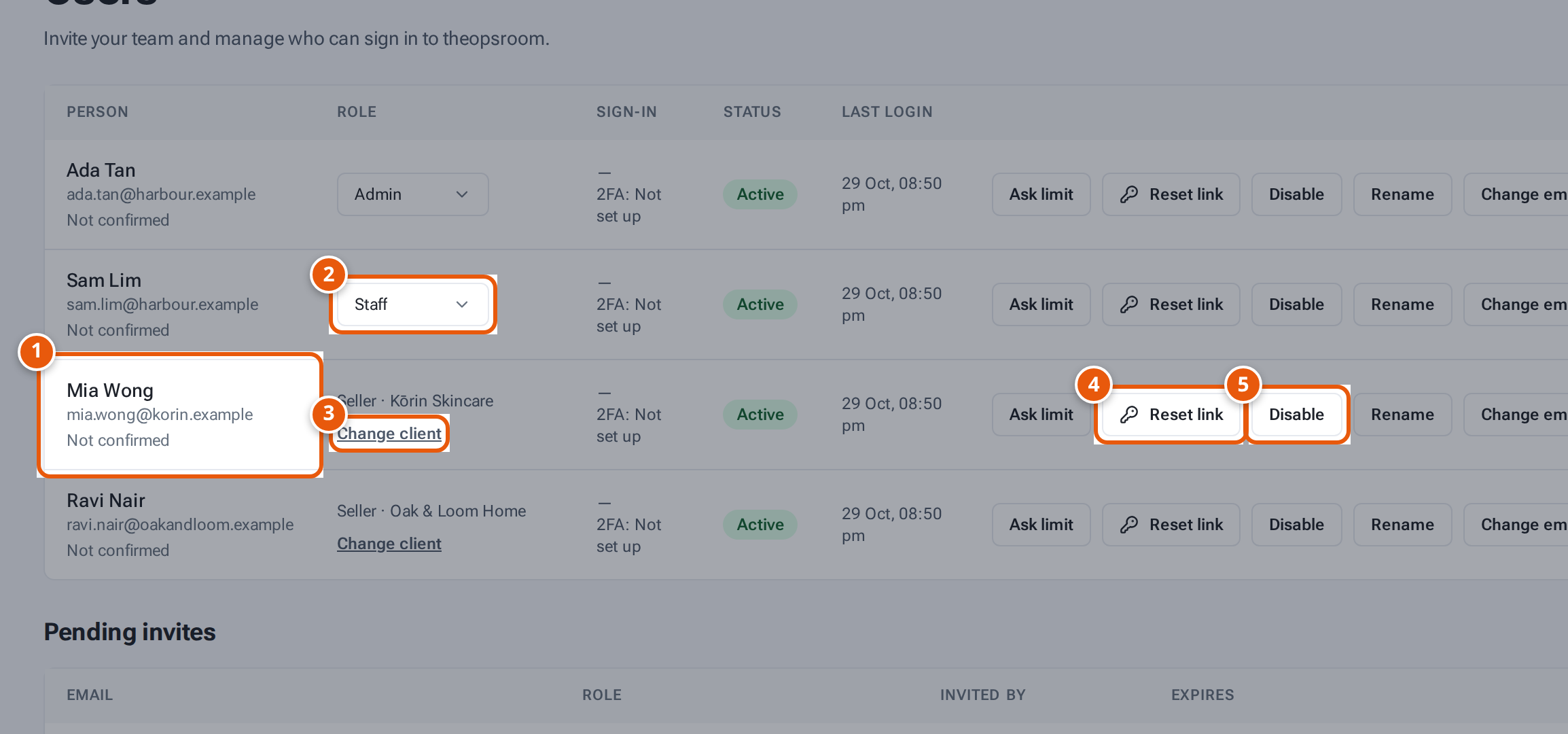
- 1. Each person’s name and email.
- 2. Change a team member’s role between Staff and Admin.
- 3. Move a seller login to another client.
- 4. Make a link to set a new password.
- 5. Stop this person signing in (and Enable to let them in again).
Change someone’s role
Section titled “Change someone’s role”- In the Role column, choose Staff or Admin for that person.
- It saves at once. You see “Sam Lim is now Admin.” (with their name and new role).
A seller’s role can’t be changed. It shows “Seller · Kōrin Skincare” (with their client) and a Change client link; see Move a seller to another client.
Make a password reset link
Section titled “Make a password reset link”- Click Reset link on the person’s row.
- The window “Reset link for …” opens: “Send this link to them — it works once and expires in 24 hours.”
- Click Copy, then Done, and send it to them. They set a new password with it (see Set a new password).
Change someone’s email
Section titled “Change someone’s email”Click Change email on their row (and Activity to see their password and email history). See Change someone’s email.
Rename someone
Section titled “Rename someone”Click Rename on their row, change the Name and save. You see “Sam Lim is now Sam L.” (the old name, then the new one).
Set someone’s Ask limit
Section titled “Set someone’s Ask limit”Ask limit on a row sets how many questions that person may ask the in-app Ask feature each day. Leave it empty to use the company’s daily limit. See Ask the guide.
Stop someone signing in
Section titled “Stop someone signing in”- Click Disable. You see “… can no longer sign in.” They’re signed out everywhere, and any reset link they had stops working.
- To let them in again, click Enable. You see “… can sign in again.”
Delete a login
Section titled “Delete a login”- Click the bin on the person’s row. (There’s none on your own row.)
- Choose what happens to their name on past records:
- Keep their name on past records (the default): history still says who did what, e.g. “Packed by Sam Lim”.
- Remove their name from past records: history shows “Deleted user” instead. This can’t be undone.
- Click Delete user. You see “… was deleted.”
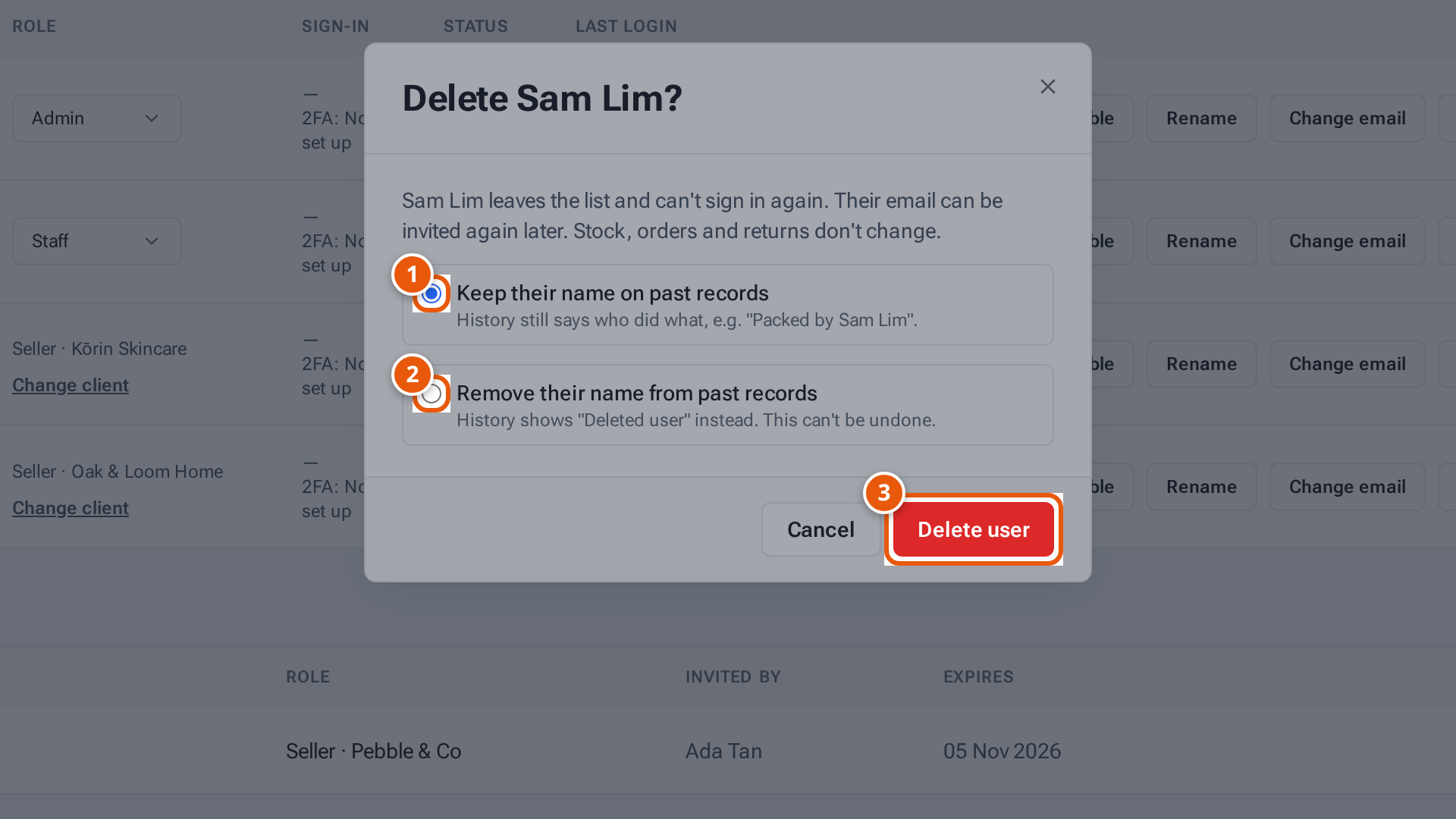
- 1. Keep their name on past records, e.g. “Packed by Sam Lim”.
- 2. Or show “Deleted user” instead. This can’t be undone.
- 3. Delete the login.
They leave the list and can’t sign in. Stock, orders and returns don’t change. Their email can be invited again later.
What each button and field means
Section titled “What each button and field means”| Item | What it means |
|---|---|
| Role | Staff or Admin. Sellers show “Seller · client”. |
| Sign-in | How they sign in: Password, Google, Password · Google, or — when theopsroom has none recorded. |
| 2FA: App / 2FA: Email / 2FA: Not set up | How the person’s second sign-in step works. |
| Reset 2FA | Clears their two-factor sign-in so they set it up again. See Lost phone? Reset someone’s 2FA. |
| Email confirmed / Not confirmed | Shown beside Sign-in. See Change someone’s email. |
| Rename | Change the name shown for them. |
| Ask limit | A personal daily limit for the in-app Ask feature. |
| Change email / Activity | Change their sign-in email; read their password and email history. |
| Status | Active or Disabled. |
| Last login | When they last signed in, or Never. |
| Reset link | A one-time link to set a new password. Greyed out for a disabled person. |
| Disable / Enable | Stop or allow signing in, without deleting anything. |
| Bin | Delete the login. |
If something goes wrong
Section titled “If something goes wrong”| Message | Why | What to do |
|---|---|---|
| A message says there must be at least one active admin left | You tried to disable or demote the last admin. | Make someone else an admin first. |
| “Keep at least one admin” | You tried to delete the last admin. | Make someone else an admin first. |
| “You can’t delete your own account” | It’s your own login. | Ask another admin. |
| “Enable this account first” | Reset links are only for active people. | Click Enable, then Reset link. |
| “A seller account’s role can’t be changed” | Seller logins stay sellers. | Invite a new login with the role you need. |
| “Invite a new seller account instead” | Staff and admins can’t become sellers. | Invite them as a seller with another email. |